
ClaudeMiner 사용 가이드
ClaudeMiner guide: a visual monitor for your Claude Code sessions
ClaudeMiner는 무엇인가
ClaudeMiner는 컴퓨터에서 돌아가고 있는 Claude Code 프로세스를 작은 광부 캐릭터로 보여 주는 시각 모니터입니다. 터미널을 여러 개 열어 두고 Claude Code에 작업을 맡기다 보면, 어느 창에서 아직 일하는 중이고 어느 창이 끝났는지, 혹은 터미널을 닫았는데 프로세스만 남아 있는 건 아닌지 알기 어렵습니다. ClaudeMiner는 이 질문에 한눈에 답하려고 만든 가벼운 앱이며, MIT 라이선스의 오픈소스입니다. 앱 자체는 Rust 기반의 Tauri로 만들어져 시스템 WebView를 쓰므로 Chromium을 따로 내장하지 않고, 공개된 문서 기준으로 메모리는 약 20MB 안팎을 사용합니다.
누구에게 필요한가
- Claude Code 세션을 두세 개 이상 동시에 돌리는 사람
- 긴 작업을 맡겨 두고 다른 일을 하다가, 끝났는지 계속 터미널을 확인하는 사람
- 터미널을 닫은 뒤에도 프로세스가 남아 CPU를 쓰는 것 같다고 느낀 적이 있는 사람
세션이 하나뿐이고 터미널을 계속 지켜보는 습관이라면 이 앱이 주는 이득은 크지 않습니다. 반대로 여러 세션을 병렬로 굴리는 작업 방식에서는 "지금 누가 일하고 있나"를 눈으로 확인할 수 있다는 점이 가장 큰 장점입니다.
화면으로 미리 보기
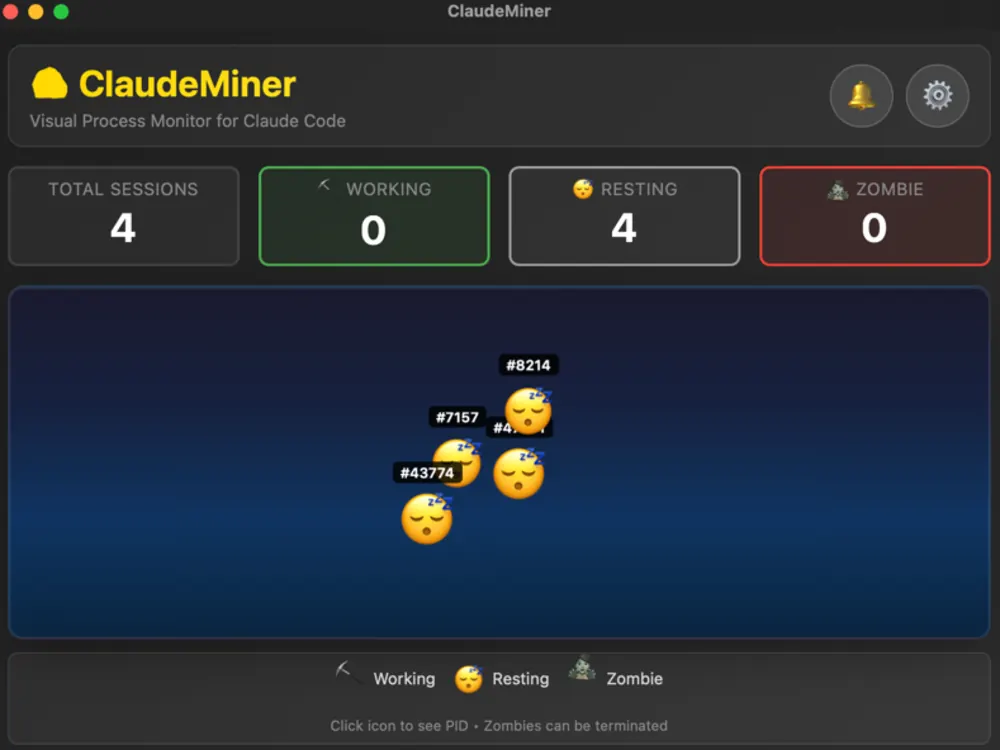
아래는 메인 창입니다. 가운데 영역의 각 캐릭터가 감지된 Claude Code 프로세스 하나이고, 이름표의 숫자는 PID(프로세스 번호)입니다. 하단 범례는 곡괭이가 작업 중, 졸린 얼굴이 휴식, 좀비 모양이 좀비 상태이며 "아이콘을 클릭하면 PID를 볼 수 있고 좀비는 종료할 수 있다"고 안내합니다.
세 가지 마이너 상태 읽는 법
ClaudeMiner는 감지한 Claude Code 프로세스마다 캐릭터 하나를 보여 주고, 프로세스의 상태에 따라 세 가지 모습 중 하나로 표시합니다. 공식 README가 정리한 기준은 다음과 같습니다.
- 작업 중(Working): 프로세스의 CPU 사용률이 10%를 넘을 때입니다. Claude Code가 응답을 생성하거나 도구를 실행하며 실제로 일하는 구간과 대체로 겹칩니다.
- 휴식(Resting): CPU 사용률이 10% 아래일 때입니다. 사용자의 입력을 기다리거나 한가한 상태로 볼 수 있습니다.
- 좀비(Zombie): 연결된 터미널(TTY)이 없는 프로세스입니다. 터미널 창이 닫혔는데 프로세스만 남은 경우를 가리킵니다.
중요한 점: 상태는 CPU 사용률이라는 간접 지표로 판정합니다. 네트워크 응답을 기다리는 중이라 CPU가 낮은 순간에도 "휴식"으로 보일 수 있으니, 휴식은 "끝났다"가 아니라 "지금 CPU를 거의 안 쓴다"는 뜻으로 받아들이세요.
어떻게 세션을 감지하는가
프로젝트 문서에 따르면 ClaudeMiner는 설정한 주기(기본 2초)마다 실행 중인 프로세스 목록에서 Claude Code 프로세스를 찾아 CPU와 메모리 사용량을 읽습니다. macOS에서는 ps 명령으로 TTY 정보를 확인해 좀비를 가려냅니다. 읽는 정보는 프로세스 ID와 CPU·메모리 수치에 한정되며, 대화 내용이나 코드를 읽지 않는다고 문서에 명시되어 있습니다. 분석이나 원격 전송도 없고, 모든 것이 로컬에서 이루어집니다.
설치와 요구 사항
- GitHub 저장소(위 링크)의 Releases에서 최신 릴리스를 확인합니다. 이 글을 쓰는 시점의 README는 Apple Silicon용 macOS 빌드(.dmg)를 안내하고 있습니다.
- .dmg를 열어 앱을 응용 프로그램 폴더로 옮기고 실행합니다.
- 알림을 사용하려면 처음 실행할 때 나오는 macOS 알림 권한 요청을 허용합니다. 나중에 바꾸려면 시스템 설정의 알림 항목에서 조정할 수 있습니다.
- Claude Code를 평소처럼 터미널에서 실행하면 몇 초 안에 해당 세션이 광부로 나타납니다.
요구 사항은 README 기준으로 macOS 10.15 이상 또는 Windows 10 이상, 그리고 Claude Code가 설치되어 있어야 한다는 것입니다. 다만 내부 문서에는 Windows에서는 프로세스 감지는 되지만 TTY 감지가 꺼져 있다고 적혀 있으므로, 좀비 판정은 macOS에서 가장 정확합니다. 소스에서 직접 빌드하려면 development/app 폴더에서 npm install 후 npm run tauri build를 실행하는 방식이 README에 소개되어 있습니다.
알림과 설정
macOS에서는 작업을 마친 마이너가 있을 때, 새 Claude Code 세션이 시작될 때, 좀비 프로세스가 발견될 때 알림을 받을 수 있습니다. 설정 창에서는 알림 켜기/끄기와 갱신 주기(1초, 2초, 5초, 10초)를 고를 수 있습니다. 또 마이너 배지의 PID를 클릭하면 복사되고, 좀비 프로세스는 앱에서 한 번에 종료할 수 있다고 문서에 적혀 있습니다.
병렬 세션을 돌릴 때의 사용 흐름
세션을 여러 개 동시에 돌리는 사람에게는 "누가 아직 일하고 있나"를 묻는 횟수 자체가 비용입니다. ClaudeMiner를 화면 한쪽에 작게 띄워 두고 다음 흐름으로 쓰면 터미널을 번갈아 열어 보는 일이 줄어듭니다.
- 작업을 맡기고 다른 일을 합니다. 세션마다 광부가 하나씩 생기는지 확인합니다. 세션 수가 예상과 다르면 어느 터미널이 안 떠 있는지 바로 보입니다.
- 알림을 기다립니다. macOS 알림이 켜져 있으면 작업을 마친 세션이 생길 때 알려 줍니다. 알림은 상태 변화를 보고 판단하므로 결과 확인은 해당 터미널에서 하세요.
- 휴식 상태의 세션을 점검합니다. 휴식은 "끝남"과 "입력 대기"를 구분하지 못하므로, 알림이 왔을 때 터미널을 열어 실제로 끝났는지 한 번 봅니다.
- 좀비를 정리합니다. 터미널을 닫았는데 좀비로 남은 프로세스는 PID를 확인한 뒤 종료합니다. 같은 이름의 다른 작업이 아닌지 PID로 대조하세요.
작업 단위를 어떻게 나눠 병렬로 돌릴지, 세션과 작업 트리를 어떻게 관리할지는 여러 Claude Code 세션을 동시에 관리하는 법에서 다룹니다.
활용 팁
- 긴 작업을 시작하고 다른 창에서 일하다가, 완료 알림이 오면 돌아와 결과를 검토하세요. 터미널을 번갈아 확인하는 습관이 줄어듭니다.
- 갱신 주기를 길게(5~10초) 두면 배터리와 CPU 부담이 더 줄어듭니다. 빠른 반응이 필요하면 1~2초가 적당합니다.
- PID 복사 기능은 다른 터미널에서 특정 세션을 직접 확인하거나 종료할 때 유용합니다.
주의할 점
- 좀비를 종료하기 전에 정말 더 이상 쓰지 않는 프로세스인지 확인하세요. 종료한 프로세스는 되돌릴 수 없습니다.
- CPU 10% 기준은 단순한 휴리스틱이라 잠깐의 오판이 있을 수 있습니다.
- ClaudeMiner는 Claude Code를 대신 제어하는 도구가 아니라 관찰용 도구이며, Claude Code 개발사와 무관한 독립 프로젝트입니다.
한계와 알려진 이슈
- 상태는 CPU 사용률이라는 간접 지표입니다. 작업 중은 CPU 10% 초과, 휴식은 10% 미만이라는 단순한 기준이라 네트워크 응답을 기다리는 순간이나 도구 실행 사이의 틈이 "휴식"으로 보일 수 있습니다. 반대로 사용자의 입력을 기다리는 상태와 막 끝난 상태를 구분하지 못합니다.
- 좀비 판정은 macOS에서 가장 정확합니다. 연결된 터미널(TTY)이 없는 프로세스를 좀비로 보는데, 개발 문서에는 Windows에서 프로세스 감지는 되지만 TTY 감지는 꺼져 있다고 적혀 있습니다. 알림도 macOS 기준으로 설명됩니다.
- 공식 안내 빌드는 Apple Silicon용 macOS입니다. README의 다운로드는 aarch64 .dmg이고, 그 밖의 환경은 소스에서 직접 빌드하는 방법이 안내됩니다.
- 갱신은 주기적 확인입니다. 기본 2초, 설정에서 1·2·5·10초 중 고릅니다. 그 사이에 끝났다 시작한 짧은 변화는 놓칠 수 있습니다.
- 관찰 전용이며 제어하지 않습니다. Claude Code를 대신 실행하거나 멈추는 기능이 없고, 앱이 하는 쓰기 동작은 사용자가 누르는 좀비 프로세스 종료뿐입니다. 종료한 프로세스는 되돌릴 수 없습니다.
- Claude Code 개발사와 무관한 독립 프로젝트입니다. Claude Code의 프로세스 이름이나 동작이 바뀌면 감지가 어긋날 수 있으니 이슈가 보이면 GitHub로 알려 주세요.
다른 방법과 비교
| 방법 | 강점 | 약점 |
|---|---|---|
| ClaudeMiner | 세션을 한 화면에 시각화, 좀비 구분과 종료, 설정 없이 바로 사용 | CPU 기반 추정이라 정확한 작업 상태는 모름, 별도 앱 설치 필요 |
| Claude Code hooks로 직접 알림 구성 | Stop·Notification 같은 공식 이벤트에 맞춰 원하는 명령을 실행, 상태 판단이 정확 | 설정 파일과 스크립트를 직접 작성해야 하고 세션 전체를 한눈에 보는 화면은 없음 |
| Activity Monitor, top, htop | 추가 설치 거의 없음, 모든 프로세스의 상세 수치 | 수많은 프로세스 속에서 Claude Code만 가려내야 하고 좀비 여부 판단이 번거로움 |
| 터미널 탭을 번갈아 확인 | 설정 없음, 출력 내용을 직접 읽음 | 세션이 늘수록 놓치기 쉽고 시간이 듦 |
두 방식은 대체재가 아니라 보완재입니다. 정확한 완료 신호가 필요하면 공식 hooks를, 여러 세션의 현황을 훑고 남은 프로세스를 정리하려면 ClaudeMiner 같은 시각 모니터가 어울립니다.
출처 및 더 읽을거리
- GitHub: JUKI-J/claudeminer (README와 릴리스)
- Claude Code 문서: Hooks reference
- Claude Code 문서: Hooks guide
- Tauri: 앱 프레임워크
자주 묻는 질문
무료인가요?
README에 100% 무료이며 계속 무료로 유지된다고 적혀 있고, 라이선스는 MIT입니다.
제 코드나 대화가 외부로 전송되나요?
프로젝트 문서에 따르면 앱은 프로세스 ID와 CPU·메모리 수치만 읽고, 텔레메트리나 분석 도구가 없으며 데이터는 기기를 떠나지 않습니다. 소스가 공개되어 있으니 직접 확인할 수도 있습니다.
Windows에서도 되나요?
README는 Windows 10 이상을 지원 대상으로 적지만, 좀비를 가려내는 TTY 감지는 macOS 중심입니다. 알림 또한 macOS 기준으로 설명되어 있습니다.
마이너가 보이지 않아요.
Claude Code가 실제로 실행 중인지, 갱신 주기가 너무 길지 않은지 확인하세요. 계속 문제가 있다면 GitHub 이슈나 지원 페이지로 알려 주세요.
여러 세션을 어떻게 운영하면 좋을까요?
작업 단위 분리와 알림 활용법은 여러 Claude Code 세션을 동시에 관리하는 법에서 정리했습니다.
작업이 끝났는데도 "작업 중"으로 남는 경우가 있나요?
상태가 CPU 사용률로 판정되므로 Claude Code가 끝난 뒤에도 잠깐 CPU를 쓰면 작업 중으로 보일 수 있습니다. 반대로 대기 중에도 CPU가 낮아 휴식으로 보입니다. 정확한 완료 여부는 터미널에서 확인하세요.
What ClaudeMiner is
ClaudeMiner is a small visual monitor that shows each Claude Code process running on your computer as a little miner character. If you keep several terminals open and hand tasks to Claude Code in each, it is hard to tell at a glance which window is still working, which one has finished, and whether a process is lingering after you closed its terminal. ClaudeMiner exists to answer those questions quickly. It is open source under the MIT license, built with Rust and Tauri on the system WebView rather than a bundled Chromium, and the project documentation puts its memory use at roughly 20MB.
Who it is for
- People who run two or more Claude Code sessions at the same time
- People who start a long task, switch to other work, and keep checking the terminal to see whether it is done
- Anyone who has suspected that a process kept using CPU after the terminal was closed
If you run a single session and watch it continuously, the benefit is small. When you work with several sessions in parallel, being able to see who is busy at a glance is the main value.
Screens at a glance
Below is the main window. Each character in the middle area is one detected Claude Code process, and the number on its tag is the PID (process ID). The legend at the bottom shows a pickaxe for working, a sleepy face for resting and a zombie figure for zombie, with the note that clicking an icon shows the PID and zombies can be terminated.
Reading the three miner states
For every Claude Code process it detects, ClaudeMiner shows one character in one of three states. The README defines them as follows.
- Working: the process is using more than 10% CPU. This usually overlaps with Claude Code generating a response or running tools.
- Resting: CPU use is below 10%. The session is idle or waiting for your input.
- Zombie: the process has no controlling terminal (no TTY). This is the case where the terminal window is gone but the process remains.
One caveat: states are inferred from CPU usage, which is an indirect signal. While Claude Code waits on a network response, CPU can be low and the miner may look like it is resting. Read "resting" as "currently using little CPU", not as "definitely finished".
How it detects sessions
According to the project documentation, ClaudeMiner scans the running process list at a configurable interval (2 seconds by default), finds Claude Code processes and reads their CPU and memory usage. On macOS it also checks TTY information through the ps command to identify zombies. The data it reads is limited to process IDs and CPU and memory figures; the documentation states that it does not read your conversations or code, has no analytics, and keeps everything local.
Installation and requirements
- Open the Releases section of the GitHub repository linked above and find the latest release. At the time of writing the README points to a macOS build for Apple Silicon (.dmg).
- Open the .dmg, move the app into your Applications folder and launch it.
- To receive notifications, allow the macOS notification permission prompt on first launch. You can change it later in System Settings under Notifications.
- Start Claude Code in a terminal as usual. Within a few seconds the session should appear as a miner.
The README lists macOS 10.15 or later, or Windows 10 or later, plus an installed Claude Code. The internal docs add that on Windows process detection works but TTY detection is disabled, so zombie detection is most accurate on macOS. To build from source, the README describes running npm install and then npm run tauri build inside development/app.
Notifications and settings
On macOS you can be notified when a miner finishes working, when a new Claude Code session starts and when a zombie process is found. The settings panel lets you toggle notifications and pick a refresh interval of 1, 2, 5 or 10 seconds. Clicking a miner badge copies its PID, and the docs say a zombie process can be terminated from the app in one click.
A workflow for running parallel sessions
For someone running several sessions at once, the number of times you ask "which one is still working?" is itself a cost. Keep ClaudeMiner small on one side of your screen and use this flow to cut down on flipping between terminals.
- Hand off the tasks and go do something else. Confirm one miner appears per session. If the count differs from what you expect, you can see right away which terminal is missing.
- Wait for the notification. With macOS notifications on, you are told when a session finishes its work. Notifications are judged from state changes, so check the result in that terminal.
- Check sessions that sit in resting. Resting cannot tell "finished" from "waiting for input", so when a notification arrives, open the terminal and confirm it really finished.
- Clean up zombies. For a process left as a zombie after you closed its terminal, confirm the PID and then terminate it. Match the PID so you do not kill an unrelated job.
How to split work for parallel runs and how to manage sessions and work trees is covered in managing multiple Claude Code sessions at once.
Practical tips
- Start a long task, work in another window, and come back when the completion notification arrives. It cuts down on cycling through terminals.
- A longer refresh interval (5 to 10 seconds) lowers battery and CPU overhead further. Use 1 to 2 seconds if you want quicker feedback.
- The PID copy feature helps when you want to inspect or stop a specific session from another terminal.
Things to watch out for
- Before terminating a zombie, make sure the process is truly unused. A terminated process cannot be brought back.
- The 10% CPU threshold is a simple heuristic, so brief misreadings are possible.
- ClaudeMiner observes; it does not control Claude Code, and it is an independent project not affiliated with the makers of Claude Code.
Limits and known issues
- State is an indirect signal: CPU usage. The rule is simple: above 10% CPU is working, below 10% is resting, so a moment of waiting on the network or a gap between tool runs can look like "resting". Conversely it cannot tell waiting for your input from having just finished.
- Zombie detection is most accurate on macOS. A process with no attached terminal (TTY) counts as a zombie, and the development notes say that on Windows process detection works but TTY detection is turned off. Notifications are described for macOS too.
- The officially documented build is macOS for Apple Silicon. The README download is an aarch64 .dmg, and building from source is described for other environments.
- Refresh is a periodic check. The default is 2 seconds, selectable in settings from 1, 2, 5 and 10 seconds. A brief stop-and-start between checks can be missed.
- It is observe-only and does not control anything. It cannot start or stop Claude Code for you, and the only write action is terminating a zombie process when you press the button. A terminated process cannot be brought back.
- It is an independent project, unrelated to Claude Code's developer. If Claude Code's process names or behavior change, detection may drift, so please report issues on GitHub.
How it compares
| Method | Strengths | Weaknesses |
|---|---|---|
| ClaudeMiner | Visualizes sessions on one screen, separates and terminates zombies, works with no setup | CPU-based estimate so it does not know the exact task state, needs a separate app |
| Building your own alerts with Claude Code hooks | Runs any command on official events such as Stop and Notification, accurate state signals | You write the settings and scripts yourself, and there is no all-sessions overview screen |
| Activity Monitor, top or htop | Little to install, detailed numbers for every process | You must pick Claude Code out of many processes, and judging zombies is tedious |
| Flipping through terminal tabs | No setup, you read the output yourself | Easy to miss things as sessions grow, and it takes time |
The two approaches complement each other rather than compete. If you need an accurate completion signal, use the official hooks; to skim the state of several sessions and clean up leftover processes, a visual monitor like ClaudeMiner fits.
Sources and further reading
- GitHub: JUKI-J/claudeminer (README and releases)
- Claude Code docs: Hooks reference
- Claude Code docs: Hooks guide
- Tauri: the app framework
FAQ
Is it free?
The README says it is 100% free and will stay free, and the license is MIT.
Is my code or conversation sent anywhere?
Per the project documentation, the app only reads process IDs and CPU and memory numbers, has no telemetry or analytics, and nothing leaves your machine. The source is public if you want to verify that yourself.
Does it work on Windows?
The README lists Windows 10 or later as supported, but the TTY-based zombie detection is macOS-centered, and the notifications are described for macOS.
I do not see any miners.
Check that Claude Code is actually running and that the refresh interval is not set too long. If the problem persists, open a GitHub issue or contact us through the support page.
How should I organize multiple sessions?
Task separation and notification habits are covered in Managing multiple Claude Code sessions at once.
Can a finished task still show as working?
Because state is judged by CPU usage, a brief burst of CPU after Claude Code finishes can show as working, and idle waiting can show as resting. Confirm real completion in the terminal.