
급식로그 사용 가이드
LunchLog Guide: Korean school meals as a widget, no login
급식로그는 우리 학교의 오늘 급식을 로그인 없이 바로 확인하고, 홈 화면과 잠금 화면 위젯으로 매일 볼 수 있게 만든 앱입니다. 먹은 급식에 가볍게 평가를 남겨 두는 기록 기능도 있습니다. 한국 학교를 대상으로 하며 화면은 한국어로만 제공됩니다. 이 가이드는 처음 설정하는 방법, 위젯과 알림을 활용하는 방법, 알레르기 정보를 볼 때 주의할 점, 개인정보 처리 방식을 정리했습니다.
어떤 앱인가요
급식 정보는 학교마다 다른 곳에 올라오고, 알림장이나 학교 홈페이지를 열어야 볼 수 있는 경우가 많습니다. 급식로그는 학교 이름만 검색해서 고르면 오늘의 급식을 바로 보여 줍니다. 급식 정보의 출처는 나이스 교육정보 개방 포털이며, 앱이 내용을 고치거나 판단하지 않고 학교가 공개한 정보를 그대로 보여 줍니다. 급식로그는 교육부, 한국교육학술정보원, 각 학교와 관계없는 개인 개발 앱입니다.
iPhone과 Android에서 모두 쓸 수 있으며 각 스토어에서 받을 수 있습니다. 한국 학교 전용이므로 날짜와 시각은 한국 표준시를 기준으로 표시됩니다.
누구에게 맞나요
- 아침마다 오늘 반찬이 무엇인지 확인하고 싶은 초등학생, 중학생, 고등학생
- 도시락이나 아침 식사를 준비하는 데 급식 메뉴를 참고하는 학부모
- 알레르기 때문에 매일 식단을 미리 확인해야 하는 가정
화면으로 미리 보기
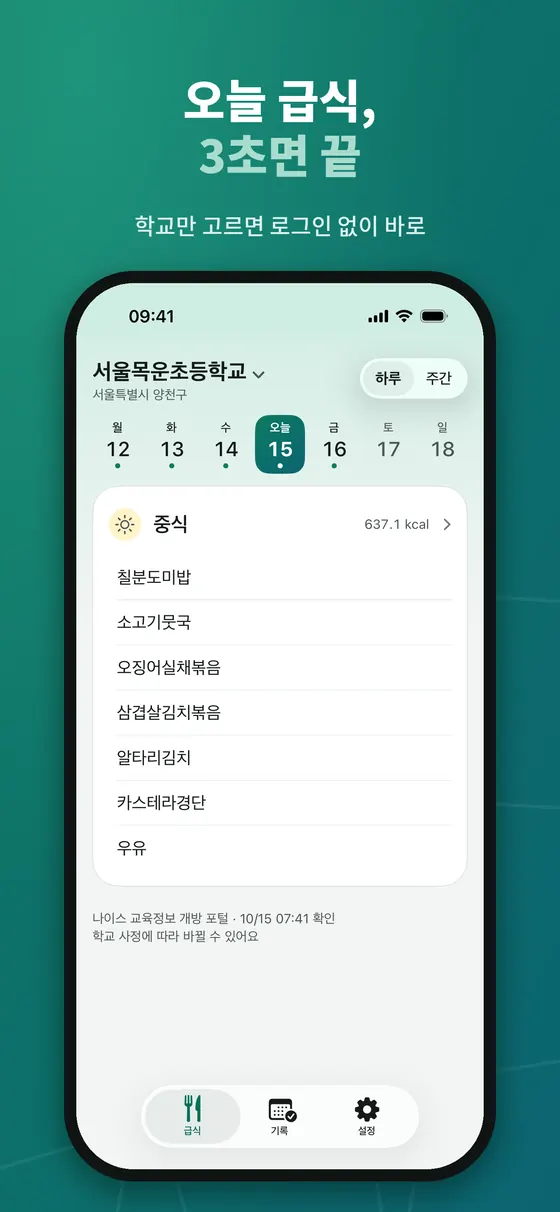
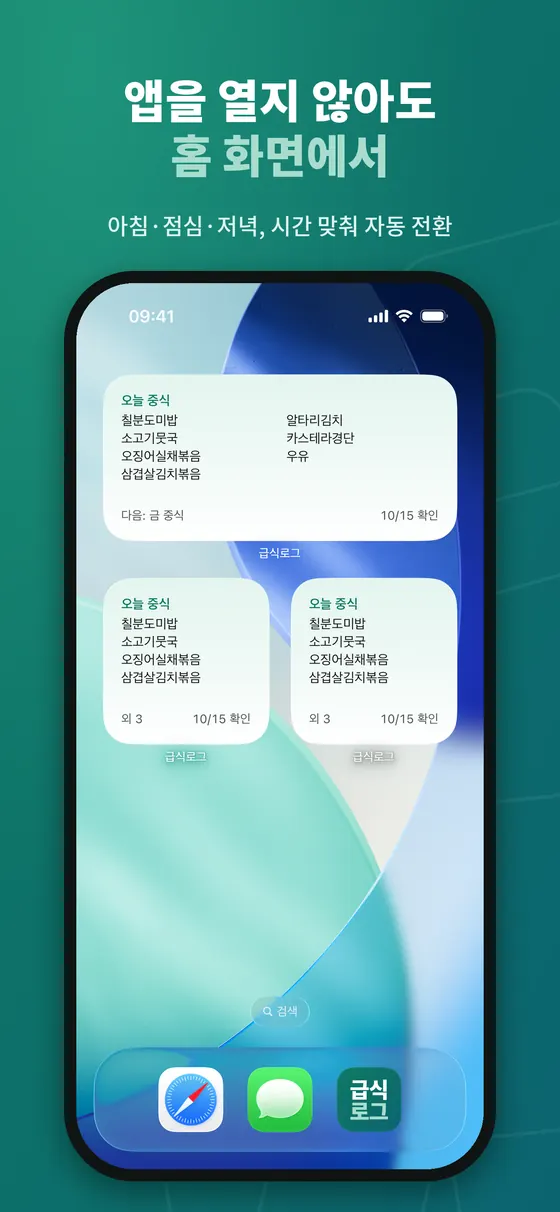
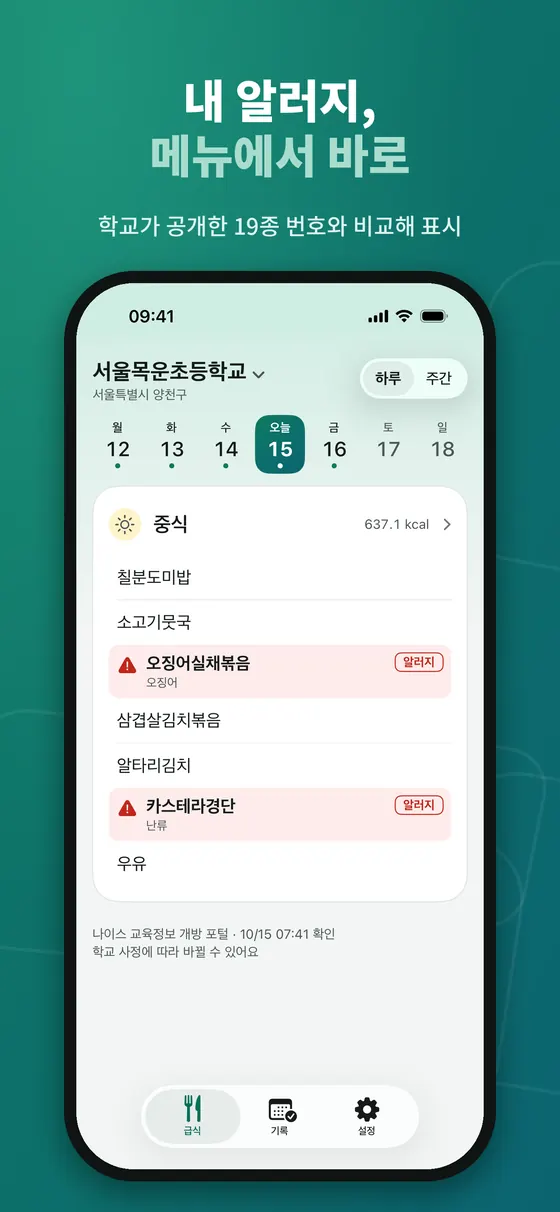
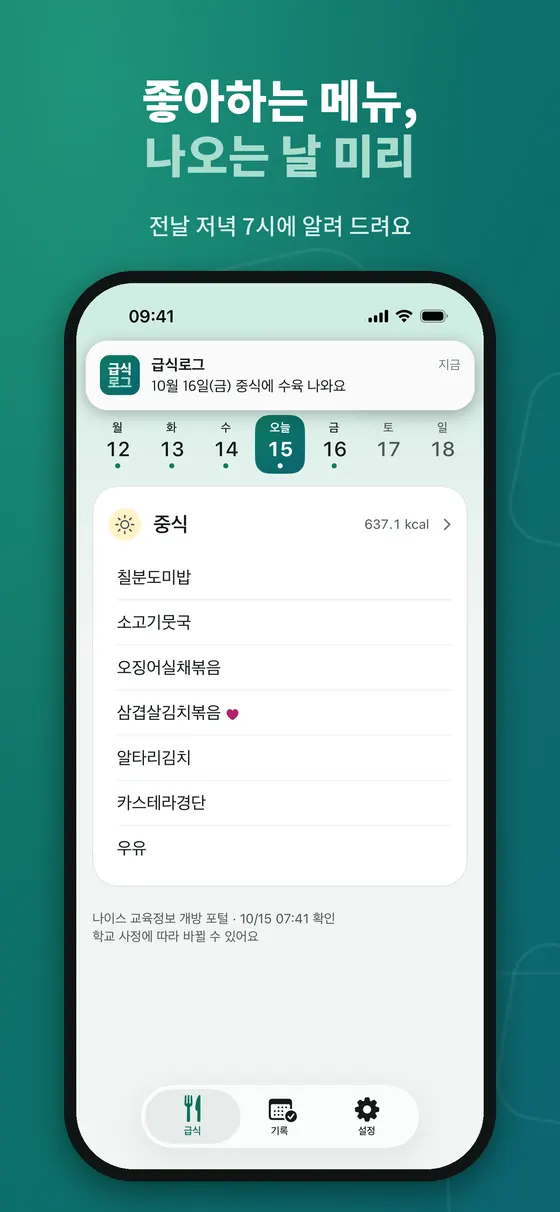
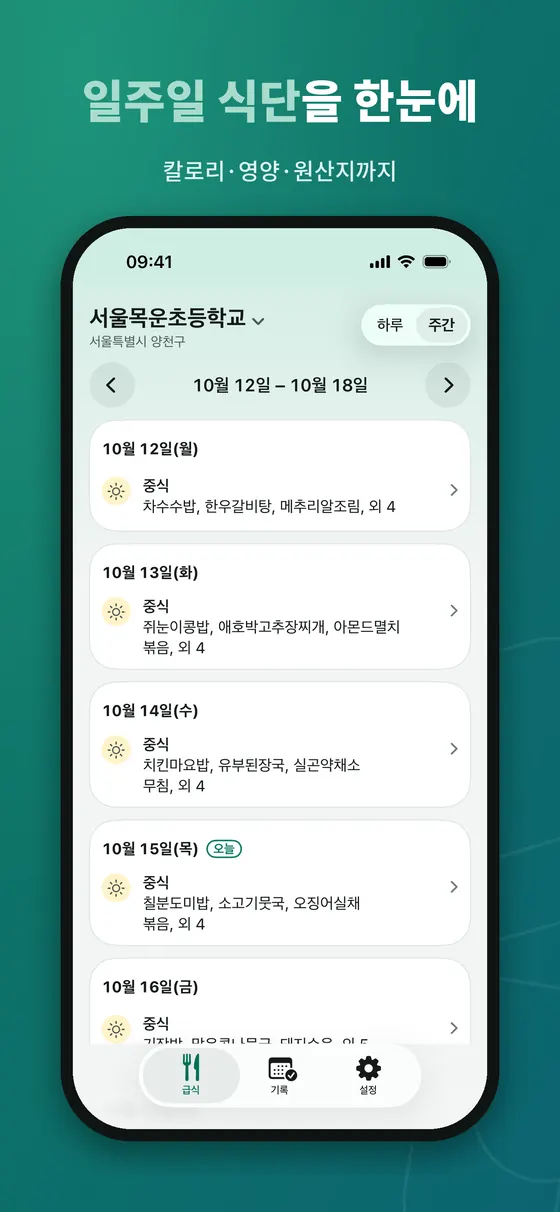
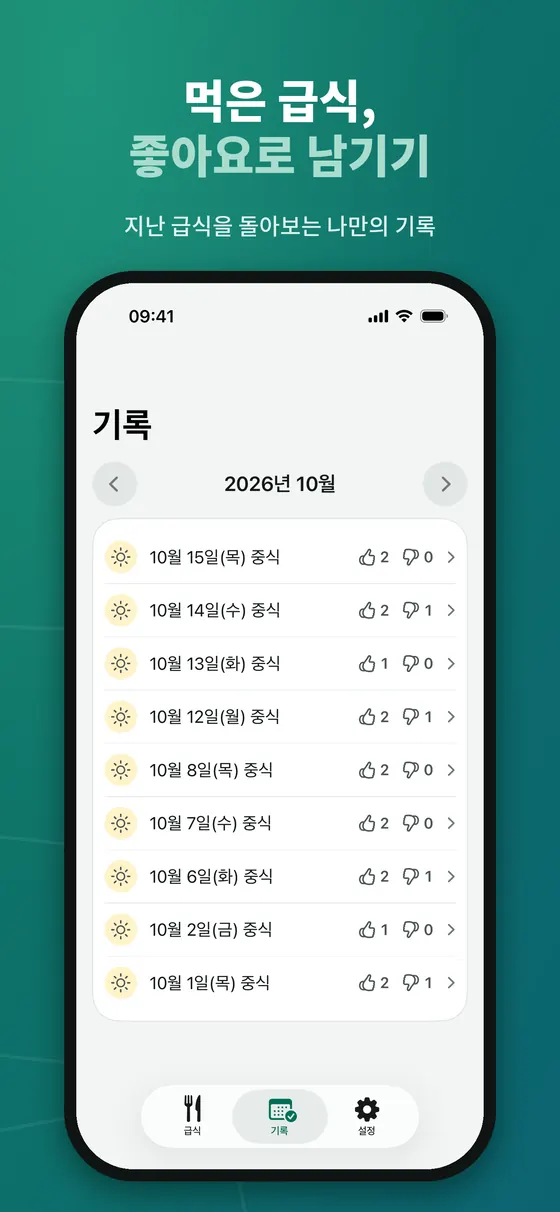
아래 여섯 장은 스토어 스크린샷이라 위쪽에 홍보 문구가 있고, 화면은 iPhone 앱입니다. 학교 이름과 메뉴는 시연용 예시입니다.
시작하기
- 앱을 설치하고 열면 첫 화면에서 학교를 고릅니다. 학교 검색은 한글 이름으로만 가능합니다. 비슷한 이름이 있을 때는 지역을 함께 확인하세요.
- 학교를 고르면 곧바로 오늘의 급식이 보입니다. 회원가입이나 로그인은 없습니다.
- 하루 보기와 주간 보기를 오가며 식단을 확인하고, 끼니를 열어 칼로리와 영양 정보, 원산지를 볼 수 있습니다.
- 설정에서 알레르기와 좋아하는 메뉴를 등록합니다.
- 홈 화면이나 잠금 화면에 위젯을 추가합니다. 추가 방법은 설정 안의 위젯 안내에 적혀 있습니다.
위젯 활용
위젯은 앱을 열지 않아도 급식을 보여 줍니다. 아침에는 조식, 점심 전에는 중식, 오후에는 석식으로 시간에 맞춰 보여 주는 끼니가 자동으로 바뀝니다. 홈 화면 위젯과 잠금 화면 위젯을 모두 쓸 수 있습니다. 위젯은 네트워크를 직접 호출하지 않고 기기에 저장된 최근 정보를 읽습니다. 그래서 가끔 앱의 백그라운드 새로 고침이 꺼져 있으면 오래된 정보가 보일 수 있으니, 새 주가 시작될 때 앱을 한 번 열어 보면 좋습니다.
알레르기 표시와 주의점
설정에서 알레르기 번호를 고르면 학교가 공개한 알레르기 번호와 겹치는 메뉴가 눈에 띄게 표시됩니다. 난류, 우유, 땅콩, 대두, 밀 등 19종의 번호를 고를 수 있습니다. 중요한 점은 이 표시가 학교가 입력한 정보를 그대로 보여 주는 것일 뿐이라는 것입니다. 식단은 학교 사정으로 바뀔 수 있고 입력이 늦거나 누락될 수 있으므로, 알레르기가 있는 경우에는 반드시 학교의 공식 안내와 영양교사 또는 영양사의 확인을 우선하세요. 이 앱은 의료적 판단을 제공하지 않습니다.
좋아하는 메뉴 알림과 급식 기록
설정에서 치킨이나 떡볶이 같은 단어를 등록하고 알림을 켜면, 해당 메뉴가 나오는 날의 전날 저녁에 알려 줍니다. 먹은 급식은 메뉴마다 좋아요나 별로를 남길 수 있고, 기록 탭에서 지난 급식을 돌아볼 수 있습니다. 평가는 끼니가 시작된 때부터 3일 동안 남길 수 있습니다. 알레르기, 좋아하는 메뉴, 평가 기록은 휴대폰 안에만 저장되고 서버로 보내지 않으며, 설정에서 내 기록을 전체 삭제할 수 있습니다.
급식 정보는 어디서 오고 언제 갱신되나
급식로그의 식단은 학교가 NEIS(나이스)에 입력하고 교육부가 개방 포털로 공개하는 급식식단정보에서 옵니다. 앱은 이 원본을 그대로 보여 주기만 하므로, 정보의 정확성과 시점은 학교가 입력한 내용에 달려 있습니다. 개발 문서에 정리된 몇 가지 특성을 알아 두면 "왜 아직 안 보이지?"라는 의문이 줄어듭니다.
- 이번 달 식단은 대부분 미리 올라오지만 다음 달은 월초에 비어 있을 수 있습니다. 개발 문서의 2026년 10월 1일 표본 확인에서는 이번 달 식단이 표본 200개 학교 중 194곳에 있었고, 다음 달 식단은 30개 학교 중 한 곳에도 없었습니다. 한 번의 표본 결과이므로 일반 규칙은 아니지만, 월초에 다음 달 식단이 안 보이는 것은 정상일 수 있다는 뜻입니다.
- 급식일이 지난 뒤에도 원본이 바뀔 수 있습니다. 포털은 최소 하루 한 번 전체를 다시 적재하며, 지난 급식도 며칠 동안은 수정될 수 있습니다. 앱은 서버가 새벽에 미리 받아 둔 캐시를 쓰므로, 학교가 당일 아침에 고친 내용은 늦게 반영될 수 있습니다.
- 학교 코드는 바뀔 수 있습니다. 2026년 7월 전남광주통합특별시교육청 출범 때 소속 학교의 행정표준코드가 일괄 변경된 사례가 있습니다. 앱은 코드 변경을 자동으로 이어 붙이도록 만들어져 있지만, 학교가 갑자기 비어 보이면 학교를 다시 선택해 보세요.
- 유치원·어린이집 급식은 NEIS에 없습니다. 초·중·고(특수학교 포함 여부는 문서에서 미확인) 중심이라 해당하지 않는 기관은 검색되지 않을 수 있습니다.
데이터가 비어 있을 때
앱은 데이터가 없는 이유를 세 가지로 나누어 알려 줍니다.
- 급식이 없는 날: 주말, 공휴일, 방학 등. 다음 급식 보기 버튼이 나옵니다.
- 학교가 아직 입력하지 않은 날: 학교가 식단을 공개하기 전입니다.
- 일시적인 오류: 잠시 뒤에 다시 시도하세요.
학교 이름이 바뀌었거나 학교 정보가 어긋난 것 같으면 학교를 다시 선택해 보세요.
개인정보와 광고, 만 14세 미만
로그인이 없고, 운영자 서버에 보내는 것은 학교 코드 정도입니다. 앱에는 Google AdMob 광고가 포함되어 있습니다. 화면 하단에 광고 표시가 있는 배너가 하나 있고, 평가 창을 닫을 때나 직접 학교를 바꾼 뒤에 전체 화면 광고가 하루 두 번까지, 3분 간격으로 나올 수 있습니다. 실행 직후나 설치한 날에는 나오지 않습니다. 학생도 쓰는 앱이므로 모든 광고 요청을 아동 대상으로 취급하고 전체 이용가 등급 광고만 받도록 해 맞춤형 광고를 쓰지 않습니다. 광고 신고는 설정에서 할 수 있습니다. 만 14세 미만 사용자와 보호자 안내를 포함한 자세한 내용은 개인정보처리방침과 지원 페이지를 확인하세요.
알레르기 정보를 볼 때 알아 둘 것
알레르기 번호는 식단 줄 끝에 괄호로 적히는 1~19번이 원본입니다. 개발 문서의 실측(약 2만 9천 줄)에서는 이 괄호 표기가 대체로 규칙적이었지만, 이름 안에 숫자가 섞이거나 괄호가 두 번 붙거나 번호가 서로 어긋나는 줄도 있었습니다. 이런 경우 앱은 번호를 단정하지 않고 "불확실"로 다루도록 설계되어 있습니다. 또 학교가 공개용 알레르기 번호를 따로 관리하는 경우 번호가 비어 있을 수도 있습니다. 결국 이 화면에서 빨간 표시가 없다고 해서 안전하다는 뜻은 아닙니다. 알레르기가 있는 학생의 보호자는 학교에서 보내는 공식 식단표와 영양(교)사의 안내를 기준으로 삼고, 앱은 미리 훑어보는 보조 수단으로만 쓰세요.
잘 쓰는 요령
- 아침 등교 전에 잠금 화면 위젯으로 오늘 급식을 확인하는 습관을 들이면 좋습니다.
- 식단이 갑자기 바뀐 것 같다면 학교 공지를 함께 확인하세요.
- 월초에는 다음 달 식단이 공개되었는지 학교 사정에 따라 다를 수 있습니다.
한계와 알려진 이슈
- 한국 학교 전용이고 화면은 한국어뿐입니다. 해외 학교, 유치원·어린이집은 대상이 아닙니다.
- 학교가 입력하지 않은 급식은 보이지 않습니다. 앱은 "급식이 없는 날", "학교가 아직 입력하지 않은 날", "일시적인 오류"를 구분해 알려 주지만, 학교의 입력 자체를 대신하지는 못합니다.
- 식단 변경 이력은 보여 주지 않습니다. 원본이 바뀌면 최신 내용으로 덮어쓰고, 업데이트 알림도 오늘과 내일 식단에 한해 중립적인 문구로만 보냅니다.
- 위젯은 기기에 저장된 최근 정보를 읽습니다. 앱의 백그라운드 새로 고침이 꺼져 있으면 오래된 정보가 보일 수 있습니다.
- 평가는 끼니 시작 후 3일 동안만 남길 수 있고 좋아요·별로 두 가지입니다. 글이나 사진 후기는 지원하지 않습니다.
- 광고가 있습니다. 배너 하나와 하루 최대 두 번의 전체 화면 광고가 나올 수 있으며 맞춤형 광고는 쓰지 않습니다.
- 의료·영양 상담 도구가 아닙니다. 칼로리와 영양 정보는 학교가 입력한 값이고 개인의 필요량과는 무관합니다.
다른 방법과 비교
| 방법 | 강점 | 약점 |
|---|---|---|
| 급식로그 | 학교만 고르면 로그인 없이 확인, 홈·잠금 화면 위젯, 알레르기·좋아하는 메뉴 알림 | 한국 학교 전용, 광고 포함, 학교의 입력과 갱신 시점에 의존 |
| 학교 홈페이지·알림장 앱 | 학교가 직접 올린 공지와 변경 사항을 함께 볼 수 있음 | 학교마다 위치와 형식이 달라 매번 찾아 들어가야 함 |
| 종이 식단표 | 가장 확실한 공식 안내, 알레르기 정보 포함 | 잊기 쉽고 변경이 반영되지 않음 |
| 급식 정보를 모아 보여 주는 다른 앱 | 기능이 다양함 | 로그인, 광고, 개인정보 처리 방식이 앱마다 다름 |
식단 변경이 잦거나 알레르기가 걸려 있다면 학교의 공식 안내를 기본으로 하고, 급식로그는 매일 아침 빠르게 확인하는 용도로 곁들이는 것이 좋습니다. 급식 정보가 공개되는 구조와 위젯 활용은 학교 급식 정보 확인하는 방법과 위젯 활용에서 더 설명합니다.
출처 및 더 읽을거리
- 나이스 교육정보 개방 포털: 급식식단정보 OpenAPI 명세
- 공공데이터포털: 교육부 급식식단정보
- 국가법령정보센터: 학교급식법 시행규칙
- Apple Developer: Keeping a widget up to date
자주 묻는 질문
로그인이나 회원가입이 필요한가요?
필요 없습니다. 학교만 고르면 바로 쓸 수 있습니다.
해외 학교나 한국 외 지역에서도 되나요?
한국 학교 정보만 제공하며 화면은 한국어로만 지원합니다.
급식 정보는 얼마나 정확한가요?
학교가 공개한 정보를 그대로 보여 주므로 학교 사정에 따라 바뀌거나 늦게 반영될 수 있습니다. 출처와 갱신 시각이 화면에 표시됩니다.
위젯이 갱신되지 않아요.
앱을 한 번 열어 보고, 기기의 백그라운드 새로 고침 설정을 확인하세요.
광고가 있나요?
있습니다. 배너 하나와 제한된 전체 화면 광고가 있고, 맞춤형 광고는 사용하지 않습니다.
문의는 어디로 하나요?
지원 페이지에서 접수할 수 있습니다. 응답 시기는 보장하지 않습니다.
다음 달 식단이 안 보여요.
학교가 아직 입력하지 않았을 가능성이 큽니다. 개발 문서의 표본 확인에서는 월초 시점에 다음 달 식단이 올라온 학교가 거의 없었습니다. 학교가 입력하면 앱에 나타나니 며칠 뒤에 다시 확인해 보세요.
알레르기 표시가 없으면 안전한가요?
아닙니다. 앱은 학교가 공개한 번호를 비교해 보여 줄 뿐이고, 입력이 늦거나 누락될 수 있습니다. 알레르기가 있다면 학교의 공식 안내와 영양(교)사 확인을 우선하세요.
LunchLog (급식로그) lets you check your school's meal for today without logging in, and see it every day through Home Screen and Lock Screen widgets. It also has a simple record feature for rating meals you ate. It is made for Korean schools and the interface is in Korean only. This guide covers first-time setup, using widgets and alerts, what to keep in mind when reading allergy information, and how the app handles privacy.
What kind of app is it?
School meal information is posted in different places by each school, and often you must open a notice board or a school website to see it. In LunchLog you search for your school by name, pick it, and today's meal appears right away. The source of the meal data is the NEIS Open Education Information Portal. The app does not edit or judge the content; it shows what the school has published. LunchLog is an independent app with no affiliation to the Ministry of Education, KERIS or any school.
It is available on iPhone and Android from each store. Because it is for Korean schools, dates and times follow Korea Standard Time.
Who is it for?
- Elementary, middle and high school students who want to know today's meal in the morning.
- Parents who use the school menu when preparing breakfast or a packed lunch.
- Families that must check the menu in advance because of allergies.
Screens at a glance
The six images below are store screenshots with a promo headline on top; the screens are the iPhone app. The school name and menus are demonstration examples.
Getting started
- Install and open the app, then pick your school on the first screen. School search accepts Korean names only. When similar names exist, check the region as well.
- Once you pick a school, today's meal appears. There is no sign-up or login.
- Switch between day and week views, and open a meal to see calories, nutrition details and the origin of ingredients.
- In settings, register your allergies and favorite menu words.
- Add a widget to your Home Screen or Lock Screen. The steps are in the in-app widget guide in settings.
Using the widgets
Widgets show the meal without opening the app. The meal shown changes with the time of day: breakfast in the morning, lunch before midday and dinner in the afternoon. Both Home Screen and Lock Screen widgets are available. Widgets do not call the network directly; they read recent data stored on the device. If the app's background refresh is off, you may sometimes see older data, so it helps to open the app once at the start of a new week.
Allergy highlighting and cautions
If you choose allergy numbers in settings, menu items that overlap with the allergy numbers the school published are highlighted. You can pick from 19 numbered allergens, including eggs, milk, peanuts, soybeans and wheat. The key point is that this highlighting only reflects what the school entered. Menus can change for school reasons, and entries can be late or missing. If you have allergies, always put the school's official notice and confirmation from the school dietitian or nutrition teacher first. The app does not provide medical judgment.
Favorite-menu alerts and meal records
If you register a word such as chicken or tteokbokki and turn the alert on, the app notifies you the evening before a meal that contains it. For meals you ate, you can leave a thumbs up or down on each menu item and look back at past meals in the history tab. Ratings can be left from the start of a meal until three days later. Allergies, favorite menu words and ratings are stored only on your phone and are not sent to a server. You can delete all of your records in settings.
Where the data comes from and when it updates
LunchLog's menus come from the meal information that schools enter into NEIS and the Ministry of Education publishes through its open data portal. The app only displays that source as it is, so accuracy and timing depend on what the school entered. A few characteristics recorded in the development notes reduce the "why is it not showing yet?" confusion.
- This month's menu is mostly posted in advance, but next month's can be empty early in the month. In the notes' sample check on October 1, 2026, this month's menu existed for 194 of 200 sampled schools while next month's existed for none of 30. It is one sample, not a general rule, but it means not seeing next month's menu at the start of a month can be normal.
- The source can change after the meal day. The portal reloads everything at least once a day, and past meals can be edited for several days. The app uses a cache the server prepares before dawn, so a fix the school makes on the same morning may appear late.
- School codes can change. When the Jeonnam-Gwangju integrated education office launched in July 2026, the administrative codes of its schools were changed in bulk. The app is built to bridge code changes automatically, but if your school suddenly looks empty, choose it again.
- Kindergarten and daycare meals are not in NEIS. The coverage is elementary, middle and high schools (the notes do not confirm special schools), so institutions outside that may not be searchable.
When data is empty
The app separates three reasons for missing data.
- A day with no meal service, such as a weekend, holiday or vacation. A next-meal button is shown.
- A day the school has not entered yet, before the school publishes the menu.
- A temporary error. Try again a little later.
If the school name has changed or the school information seems off, try selecting the school again.
Privacy, ads and users under 14
There is no login, and the main thing sent to the operator's server is the school code. The app includes Google AdMob ads: one labeled banner at the bottom of the screen, and a full-screen ad that can appear up to twice a day, at least three minutes apart, after you close the rating sheet or change school yourself. It does not appear right after launch or on the day of installation. Because students also use the app, every ad request is treated as child-directed and limited to the all-ages rating, so personalized ads are not used. You can report an ad in settings. For details, including guidance for users under 14 and their guardians, see the privacy policy and the support page.
What to know when reading allergy information
Allergy numbers come from the parenthesized numbers 1 to 19 at the end of each menu line in the source. In the notes' measurement of about 29,000 lines, this notation was mostly regular, but some lines had digits inside the name, two parenthesized groups, or numbers that disagreed. In those cases the app is designed not to assert a number but to treat it as uncertain. Also, when a school manages a separate public allergy list, the numbers can be missing. So the absence of a red mark on this screen does not mean a dish is safe. If you are the guardian of a child with an allergy, treat the school's official menu and the dietitian's guidance as the standard, and use the app only as a quick preview.
Tips
- Build a habit of checking the Lock Screen widget before leaving for school.
- If a menu seems to have changed suddenly, check the school's notice as well.
- Whether next month's menu is already published at the start of a month depends on the school.
Limits and known issues
- It is for Korean schools only and the interface is Korean only. Overseas schools, kindergartens and daycares are out of scope.
- Meals the school has not entered do not show. The app tells apart "no meal today", "the school has not entered it yet" and "a temporary error", but it cannot enter data for the school.
- It does not show a history of menu changes. When the source changes, the latest content overwrites it, and update notices cover only today and tomorrow with neutral wording.
- Widgets read recently stored information on the device. If the app's background refresh is off, stale data can appear.
- Ratings can be left for 3 days from the start of a meal and come in two kinds, like and dislike. Text or photo reviews are not supported.
- There are ads. One banner and up to two full-screen ads per day can appear, and personalized ads are not used.
- It is not a medical or nutrition counseling tool. Calories and nutrition are values the school entered and have nothing to do with your personal needs.
How it compares
| Method | Strengths | Weaknesses |
|---|---|---|
| LunchLog | Pick a school and check with no login, home and lock screen widgets, allergy and favorite-menu alerts | Korean schools only, contains ads, depends on the school's entry and update timing |
| The school website or a notice-board app | Notices and changes posted by the school itself sit alongside | Location and format differ per school, so you have to go looking every time |
| A paper menu | The most reliable official guide, includes allergy information | Easy to forget and does not reflect changes |
| Other apps that aggregate meal data | A variety of features | Login, ads and privacy handling differ per app |
If menus change often or an allergy is involved, make the school's official guidance your baseline and use LunchLog as a quick morning check on top. How meal data gets published and how to use widgets are explained further in our article on checking school lunch info and widgets.
Sources and further reading
- NEIS Open Education Information Portal: meal service API specification (Korean)
- Korea Public Data Portal: Ministry of Education meal service data (Korean)
- Korea Law Information Center: School Meals Act Enforcement Rule (Korean)
- Apple Developer: Keeping a widget up to date
FAQ
Do I need to log in or sign up?
No. Pick your school and use it right away.
Does it work for schools abroad?
It provides information for Korean schools only, and the interface is Korean only.
How accurate is the meal information?
It shows what the school published, so it can change or be reflected late depending on the school. The source and update time are shown on screen.
My widget is not updating.
Open the app once and check the device's background refresh setting.
Are there ads?
Yes. There is one banner and a limited full-screen ad, and personalized ads are not used.
Where do I ask for help?
Use the support page. A response time is not guaranteed.
Next month's menu does not show.
The school most likely has not entered it yet. In the development notes' sample check, almost no schools had next month's menu at the start of a month. It will appear in the app once the school enters it, so check again in a few days.
Does no allergy mark mean a dish is safe?
No. The app only compares against the numbers the school published, and entries can be late or missing. If you have an allergy, rely on the school's official guidance and the dietitian first.