학교 급식 정보 확인하는 방법과 위젯 활용
How to check Korean school meal info, read allergy numbers 1 to 19 and use widgets
"오늘 급식 뭐야?"는 학교에 다니는 아이와 학부모가 거의 매일 묻는 질문입니다. 식단은 공개돼 있지만 정작 어디에서 오는 정보인지, 몇 시쯤 믿을 수 있는지, 알레르기 번호는 어떻게 읽는지는 한곳에 정리된 글이 드뭅니다. 이 글은 식단 정보가 학교에서 여러분의 휴대폰까지 오는 경로를 먼저 풀고, 확인 방법을 비교한 다음, 알레르기 번호 1번부터 19번까지를 표로 정리합니다. 그 뒤에 데이터가 어긋나는 이유, 위젯으로 확인 시간을 줄이는 방법, 급식 앱을 고르는 기준을 다룹니다.
알레르기가 있는 경우 앱·화면에 보이는 번호는 참고용입니다. 그날의 최종 안내는 항상 학교(영양교사·담임)의 공식 안내를 기준으로 하세요. 이 글은 의료 조언이 아닙니다.
급식 정보가 내 폰에 오기까지
학교 급식 식단은 학교의 영양교사나 영양사가 작성해 교육행정정보시스템(나이스, NEIS)에 입력합니다. 이 가운데 일반에 공개해도 되는 항목, 즉 학교, 날짜, 끼니 구분, 요리명, 알레르기 번호, 열량, 영양 정보, 원산지 같은 값이 나이스 교육정보 개방 포털(open.neis.go.kr)과 공공데이터포털(data.go.kr)의 오픈 API로 제공됩니다. 급식 전용 앱 대부분은 이 API를 직접 또는 자체 서버를 거쳐 호출해서 화면을 그립니다. 결국 경로는 학교, 나이스, 개방 포털, 앱 순서이고, 원본은 어디까지나 학교가 입력한 값입니다.
개방 포털의 급식식단정보 API는 학교 단위로 조회합니다. 교육청 코드와 학교 코드를 함께 보내야 하고, 날짜 하나나 기간을 지정할 수 있으며, 응답에는 끼니(조식·중식·석식), 요리명 목록, 열량(예: 1048.9 Kcal), 영양 정보, 원산지 정보, 적재 일시가 들어 있습니다. 영양 정보는 탄수화물, 단백질, 지방, 비타민 A, 티아민, 리보플라빈, 비타민 C, 칼슘, 철분의 아홉 가지 라벨로 제공되는 것이 SETLOG의 점검(2026-10-01) 기준 관찰이었고, 원산지는 값이 비어 있는 줄이 흔합니다. 이 숫자들은 학교가 입력한 만큼만 나옵니다. 입력이 없으면 API도 비어 있습니다.
그래서 앱에서 본 식단이 학교 홈페이지와 다르면 앱이 틀렸다고 단정하기보다, 둘 중 어느 쪽이 더 최근에 갱신됐는지부터 보세요. 학교가 홈페이지 식단표만 고치고 나이스 입력은 늦게 하는 경우도, 반대의 경우도 있습니다. 점검에서 확인한 바로는 포털은 최소 하루 한 번 전체를 다시 적재했고, 급식일로부터 약 일주일이 지난 행은 더 바뀌지 않는 패턴이었습니다. 이는 우리가 관찰한 동작이지 포털이 약속한 규칙은 아니므로, 갱신 시각이 정확히 몇 시라고 믿고 계획을 세우지는 마세요.
급식 정보를 확인하는 방법 비교
어떤 경로가 더 좋다는 정답은 없습니다. 목적이 "오늘 점심 한눈에"인지, "알레르기 때문에 정확히"인지에 따라 쓰는 방법이 달라집니다.
| 경로 | 장점 | 한계 | 이럴 때 |
|---|---|---|---|
| 학교 홈페이지·가정통신문 | 학교가 직접 올린 원본. 변경 공지가 가장 먼저 올라옴 | 학교마다 형식이 달라 찾기 번거롭고 모바일에서 보기 불편한 경우가 있음 | 알레르기 확인, 변경 여부 확인 |
| 학교가 쓰는 알림 앱 | 푸시로 공지와 함께 받음 | 식단이 앱마다 노출 방식이 다르고 학교가 쓰지 않으면 없음 | 학교가 이미 쓰는 경우 |
| 나이스 대국민서비스(교육청별) | 교육행정 정보를 공식 경로로 조회 | 교육청별 서비스 점검·중지 공지가 있었고 화면 구성이 복잡함 | 공식 화면으로 확인하고 싶을 때 |
| 개방 포털 API 직접 조회 | 가공 없는 원 데이터와 필드를 볼 수 있음 | 인증키가 필요하고 JSON을 읽어야 함. 일반 사용자용이 아님 | 개발자, 데이터 검증 |
| 급식 전용 앱·위젯 | 하루·주간 보기, 위젯, 알림이 편함 | 앱이 가진 값은 포털에 올라간 시점의 값. 앱마다 갱신 주기가 다름 | 매일 빠르게 훑어볼 때 |
실용적인 조합은 두 가지입니다. 매일 빠르게 볼 때는 위젯이나 앱으로 확인하고, 알레르기가 걸린 날이나 이례적인 메뉴가 보이는 날에만 학교 공식 경로를 한 번 더 확인하는 방식입니다. 이렇게 하면 앱의 편의를 누리면서 중요한 순간에는 원본으로 검증하게 됩니다.
알레르기 번호 1~19 읽는 법
식단표에서 요리명 끝에 붙는 괄호 속 숫자는 그 요리에 쓰인 원재료 가운데 알레르기를 일으킬 수 있는 식품의 번호입니다. 학교급식법령은 2013년 11월에 개정되어 학교가 식단표에 알레르기 유발식품 정보를 알리도록 하고 있고, 항목은 식품의약품안전처가 고시한 표시기준의 19종을 따릅니다. 시도교육청 안내 자료에 따르면 식품 원재료는 의무 적용이고, 그 밖의 식재료와 성분은 권장 사항으로 설명됩니다. 번호는 아래 표와 같습니다.
| 번호 | 항목 | 참고 |
|---|---|---|
| 1 | 난류 | |
| 2 | 우유 | |
| 3 | 메밀 | |
| 4 | 땅콩 | |
| 5 | 대두 | |
| 6 | 밀 | |
| 7 | 고등어 | |
| 8 | 게 | |
| 9 | 새우 | |
| 10 | 돼지고기 | |
| 11 | 복숭아 | |
| 12 | 토마토 | |
| 13 | 아황산류 | 표시기준상 권장 항목으로 안내되는 경우가 많음 |
| 14 | 호두 | |
| 15 | 닭고기 | |
| 16 | 쇠고기 | |
| 17 | 오징어 | |
| 18 | 조개류(굴, 전복, 홍합 포함) | |
| 19 | 잣 | 2020년 1월 1일부터 적용된 항목 |
번호는 보통 마침표로 이어서 씁니다. 예를 들어 식단에 떡잡채 (5.6.10.13.18)이라고 적혀 있으면 대두, 밀, 돼지고기, 아황산류, 조개류가 쓰였다는 뜻입니다. 번호가 하나도 없으면 해당 원재료가 없다는 뜻일 수도 있지만 입력이 빠졌을 수도 있다는 점을 같이 기억해야 합니다.
번호를 읽을 때 헷갈리는 경우
- 이름 속 숫자: 새우튀김1, 전복솥밥(1+1), 사과(홍로,9월)처럼 번호가 아닌 숫자가 요리명에 섞이는 경우가 있습니다. 우리 점검에서는 전체 요리명 약 29,000줄 가운데 1% 안팎이었습니다.
- 범위 밖 숫자: 22, 20, 0처럼 1~19에 없는 숫자는 알레르기 번호가 아니라 크기, 학년, 반 표기일 가능성이 큽니다.
- 괄호가 두 번 나오는 경우: 깍두기(2) (9.13)처럼 앞뒤 괄호가 서로 다르면 한쪽이 입력 오류일 수 있습니다. 가장 뒤쪽 괄호를 공식 표기로 보는 앱이 많지만, 의심이 가면 학교에 물어보는 편이 안전합니다.
- 구분 기호: 마침표 대신 쉼표를 쓴 학교도 있습니다. 읽는 방법은 같습니다.
- 공개 알레르기와 식단 알레르기: 나이스에서 학교가 "공개 알레르기"를 따로 관리하면 그 값이 우선하는 구조라서, 학교 홈페이지 표기와 값이 다를 수 있습니다.
또 하나 짚어 둘 점은 이 번호가 식단에 쓰인 원재료를 기준으로 한다는 사실입니다. 같은 조리 설비를 쓰는 데서 생기는 교차 접촉이나, 가공식품에 미량 들어간 성분까지 번호만으로 알 수는 없습니다. 중증 알레르기라면 번호 확인에 더해 영양교사와 미리 상담해 대체식 가능 여부를 확인해 두는 것이 안전합니다.
데이터가 어긋나는 이유와 한계
- 공개 시점: 학교가 한 달치 식단을 미리 입력하는 경우가 많습니다. SETLOG이 2026-10-01에 표본 200곳을 조회했을 때 194곳에 이번 달 식단이 있었습니다. 반면 같은 날 다음 달 식단을 조회한 표본 30곳 중에는 공개된 곳이 없었습니다. 다음 달 식단은 월말이나 월초에야 올라오는 경우가 많다고 보면 됩니다. 정해진 규칙은 확인하지 못했습니다.
- 당일 변경: 식재료 수급, 행사, 학사 일정으로 식단이 바뀌면 학교가 수정해 입력하지만 앱에는 시차를 두고 반영됩니다. 앱은 식단의 변경 이력을 보여 주지 않으니 바뀐 것을 알 수 없다는 점도 한계입니다.
- 학교 코드 변경: 2026년 7월 1일 전남광주통합특별시교육청이 출범하며 소속 학교들의 행정표준코드가 한꺼번에 바뀐 사례가 있었습니다. 이런 일이 있으면 앱에서 학교가 갑자기 조회되지 않을 수 있고, 이때는 학교를 다시 선택하면 대부분 해결됩니다.
- 대상 범위: 개방 포털 식단은 초·중·고 중심입니다. 유치원과 어린이집은 나이스 식단 데이터에 없어서 이 방식으로 볼 수 없습니다.
- 학교가 입력하지 않은 날: 방학, 휴업일, 급식이 없는 날은 데이터가 비어 있습니다. 좋은 앱은 "급식 없는 날", "학교가 아직 입력하지 않음", "일시적 오류"를 구분해서 보여 줍니다. 그렇지 않은 앱은 세 경우가 모두 "정보 없음"으로 보여 헷갈립니다.
- 서비스 장애: 포털이나 교육청 시스템에 점검과 과부하가 있었던 사례가 공지된 바 있습니다. 갑자기 식단이 안 뜰 때 앱 문제가 아니라 원본 시스템 문제일 수도 있습니다.
위젯과 알림으로 확인 시간 줄이기
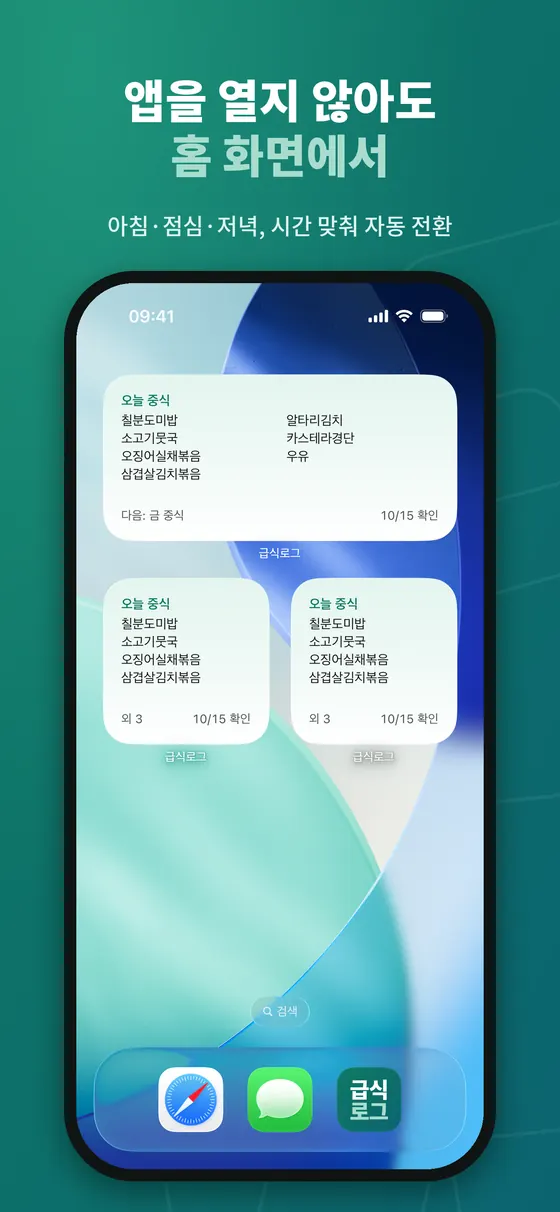
식단 확인은 하루 한 번, 몇 초면 끝나야 하는 일입니다. 앱을 열어 학교와 날짜를 고르는 과정이 반복되면 귀찮아져 점점 확인을 빼먹게 되는데, 위젯은 이 마찰을 없앱니다. 위젯의 구조적 장점은 앱이 미리 받아 저장해 둔 데이터를 화면에 그린다는 점입니다. 그래서 전파가 약한 곳에서도 마지막으로 받은 식단은 보입니다. 다만 위젯이 얼마나 자주 다시 그려지는지는 운영체제가 정하므로, 앱을 한동안 열지 않았다면 오래된 식단이 보일 수 있습니다.
iPhone
홈 화면의 빈 곳을 길게 눌러 편집 모드에 들어간 뒤 왼쪽 위의 더하기(+) 버튼을 누르고 앱을 검색해 크기를 고릅니다. 잠금 화면은 잠금 화면을 길게 눌러 맞춤화로 들어가 위젯 영역을 눌러 추가합니다. 크기는 작은 것이 한눈에 보기 좋고, 중간 이상은 메뉴가 더 많이 보입니다.
Android
홈 화면의 빈 곳을 길게 눌러 위젯 메뉴를 열고 앱을 찾아 원하는 크기를 끌어다 놓습니다. 제조사 런처마다 메뉴 이름이 조금씩 다릅니다.
위젯이 오래된 식단을 보여 줄 때
- 앱을 한 번 열어 최신 데이터를 받게 합니다.
- 기기의 백그라운드 새로 고침(iOS)이나 배터리 절약 설정(Android)이 앱을 막고 있지 않은지 확인합니다.
- 위젯을 지웠다가 다시 추가해 봅니다.
- 학교가 아직 오늘 식단을 입력하지 않았다면 앱을 고쳐도 소용없습니다. 학교 홈페이지에 있는지 확인하세요.
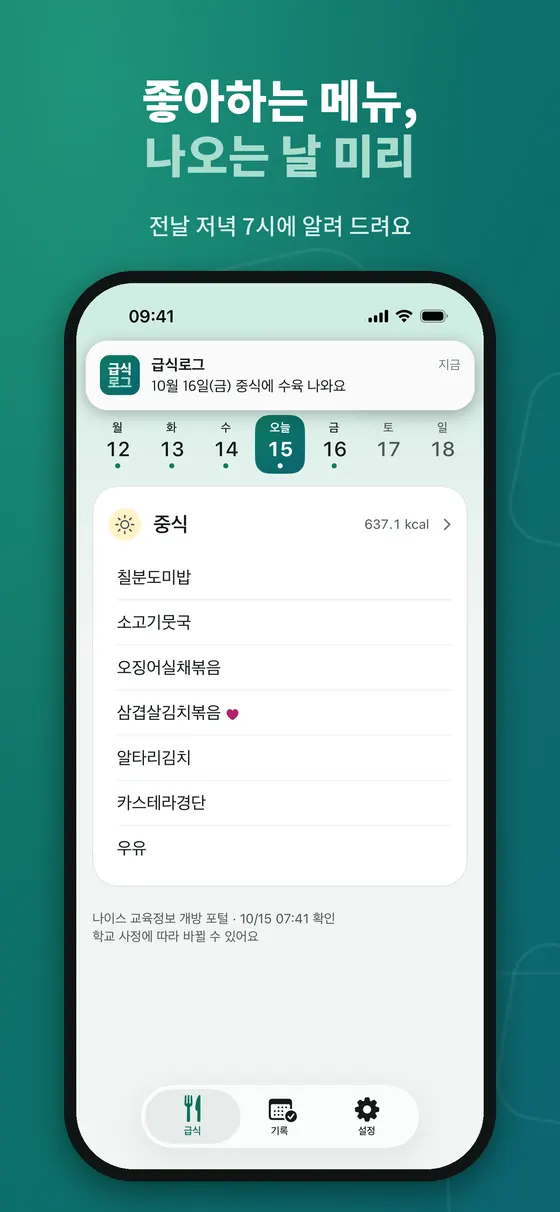
알림을 쓴다면 "내가 좋아하는 메뉴가 내일 나온다"처럼 가치가 분명한 알림만 켜 두는 편이 오래갑니다. 식단 전체를 매일 푸시로 받으면 곧 꺼 버리게 됩니다.
상황별 활용
학부모
일요일 저녁에 주간 보기를 훑어 도시락이나 간식이 필요한 날을 정합니다. 자녀가 둘 이상이고 학교가 다르면 앱에서 학교를 따로 확인해야 합니다. 아침 등교 준비 때는 잠금 화면 위젯으로 충분합니다.
학생
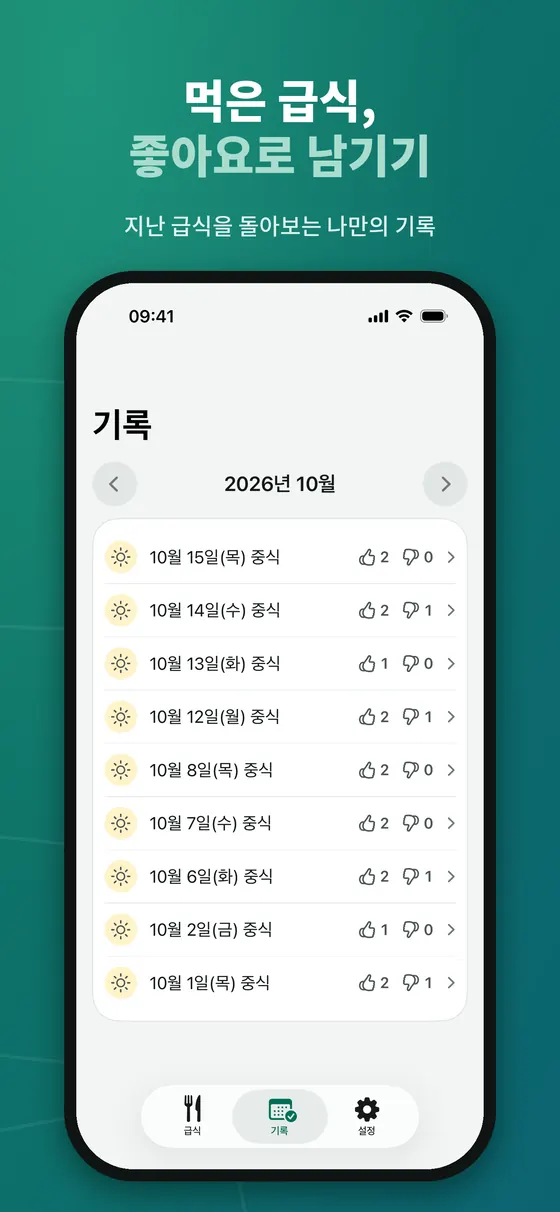
좋아하는 메뉴 키워드를 등록해 두면 기다릴 이유가 생깁니다. 먹은 급식에 좋아요·싫어요를 간단히 남겨 두면 한 달 뒤에 어떤 메뉴가 괜찮았는지 돌아볼 수 있습니다.
알레르기가 있는 가정
월초에 한 달 식단을 훑으며 걱정되는 날을 표시합니다. 그날은 앱의 번호 표시와 학교 공식 식단표를 둘 다 확인하고, 필요하면 영양교사에게 대체식을 미리 요청합니다. 번호가 바뀌었는지는 전날 저녁과 당일 아침에 한 번씩 보면 충분합니다.
급식 앱을 고르는 기준
- 출처와 마지막 확인 시각이 화면에 나오는지
- 급식 없는 날, 학교 미입력, 일시 오류를 구분하는지
- 가입이나 로그인 없이 쓸 수 있는지, 불필요한 개인정보를 요구하지 않는지
- 알레르기와 선호 설정이 기기 안에만 저장되는지
- 광고가 어떤 형태로 나오는지, 아이가 쓸 때의 보호 조치가 있는지
- 번호를 눌렀을 때 항목 이름을 풀어서 보여 주는지
급식로그: 이 기준에 맞춰 만든 앱
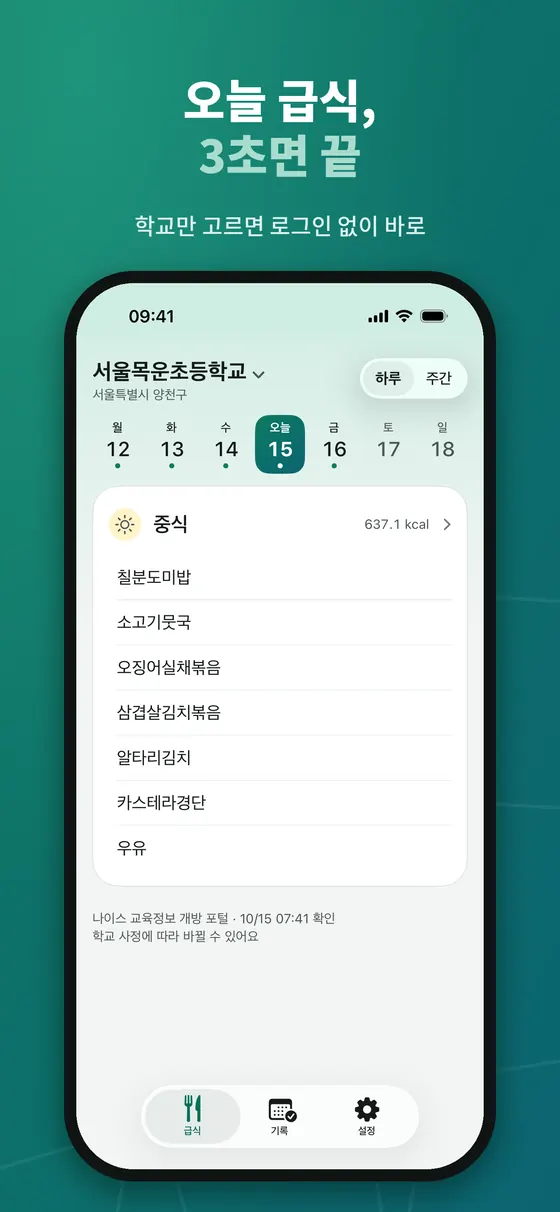
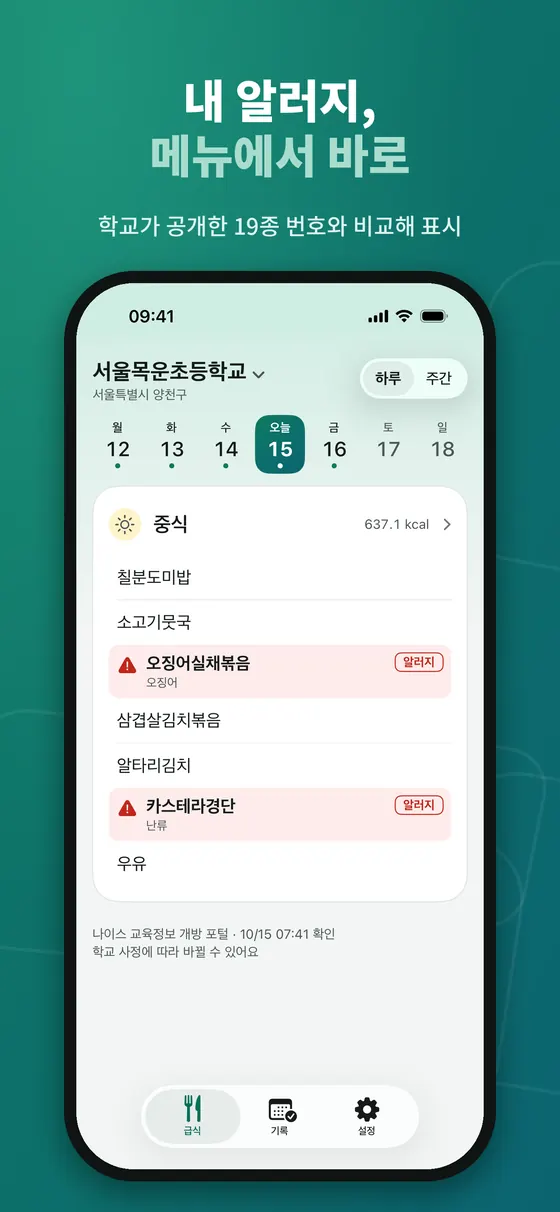
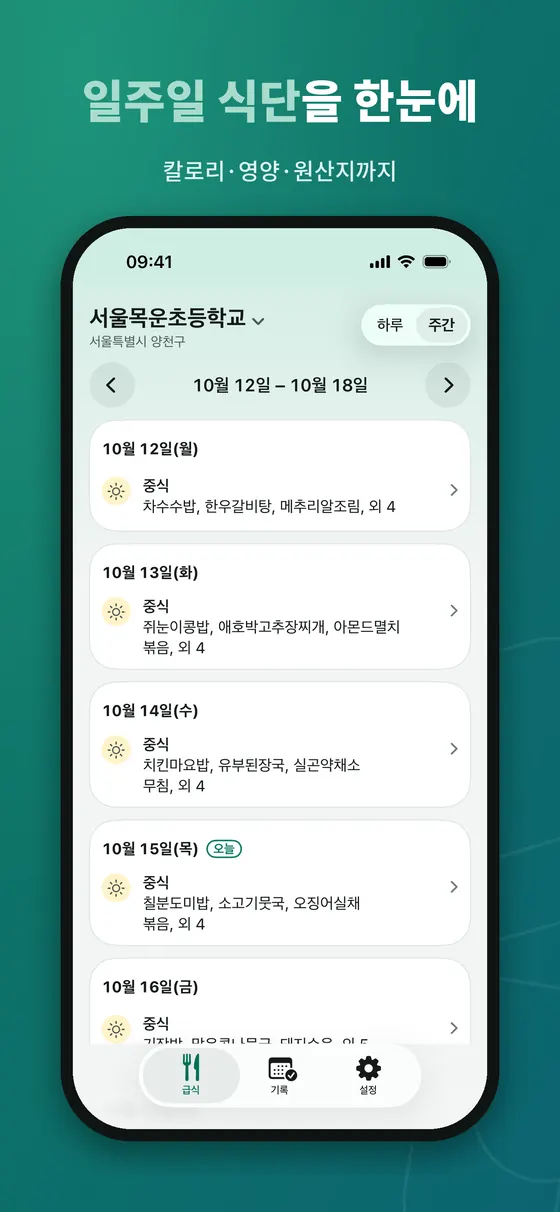
SETLOG의 급식로그는 위 기준을 염두에 두고 만든 iPhone·Android용 앱입니다. 학교를 고르면 로그인 없이 바로 오늘 식단이 나오고, 하루 보기와 주간 보기를 오갈 수 있으며, 화면 아래에는 "나이스 교육정보 개방 포털"이라는 출처와 확인 시각, "학교 사정에 따라 바뀔 수 있어요"라는 안내가 항상 표시됩니다. 내가 설정한 알레르기에 해당하는 메뉴는 색을 달리해 눈에 띄게 하고, 학교가 공개한 19종 번호와 비교해 어떤 항목 때문인지(예: 오징어, 난류)를 함께 보여 줍니다.
급식로그의 한계
- 국내 초·중·고 급식만 다루고 한국어 화면만 지원합니다. 유치원·어린이집 식단은 볼 수 없습니다.
- 식단 변경 이력은 보관·비교하지 않습니다. 업데이트 알림도 오늘과 내일 식단에 한해 중립적인 문구로만 나갑니다.
- 광고가 포함됩니다. 급식 홈 하단 배너와, 평가 시트를 닫을 때·학교를 직접 바꿀 때의 전면 광고가 있으며 하루 노출 횟수는 제한되어 있습니다.
- 번호는 학교가 공개한 값을 그대로 비교할 뿐입니다. 학교 입력이 틀리면 앱도 틀립니다. 입력 오류가 의심되면 학교 공식 안내를 따르세요.
누구에게 맞고, 누구에게 안 맞나
잘 맞는 경우
- 매일 학교 급식을 빠르게 훑고 싶은 학생·학부모
- 로그인과 회원가입이 번거로운 사람
- 위젯으로 확인하는 습관을 원하는 사람
맞지 않는 경우
- 광고가 있는 앱이 싫은 사람
- 유치원·어린이집 식단이 필요한 경우
- 중증 알레르기로 학교와 직접 소통이 필수인 경우(앱은 보조 수단일 뿐)
출처 및 더 읽을거리
- 인천광역시교육청 식생활관리 · 식품알레르기(19종 목록·식단표 표시 방법)
- 나이스 교육정보 개방 포털 · 급식식단정보 API 명세
- 공공데이터포털 · 교육부 학교급식 식단 정보(오픈 API)
- 국가법령정보센터 · 학교급식법 시행규칙
자주 묻는 질문
앱에 나온 식단과 학교 안내가 다르면 무엇을 믿어야 하나요?
학교의 공식 안내를 우선하세요. 앱은 개방 포털에 올라간 시점의 값을 보여 주기 때문에 학교가 홈페이지만 먼저 고친 경우 시차가 생길 수 있습니다.
학교 급식 알레르기 번호는 몇 번까지 있나요?
1번 난류부터 19번 잣까지 19종입니다. 전체 목록은 이 글의 표에 정리했고, 13번 아황산류는 표시기준상 권장 항목으로 안내되며 19번 잣은 2020년 1월 1일부터 적용된 항목입니다.
방학 중에는 왜 급식이 보이지 않나요?
급식을 제공하지 않으면 학교가 식단을 입력하지 않기 때문입니다. 방학 중에도 급식을 하는 학교(예: 기숙사 운영)는 데이터가 보일 수 있습니다.
다음 달 식단은 언제 확인할 수 있나요?
학교마다 다릅니다. SETLOG이 2026-10-01에 표본 30곳을 확인했을 때 다음 달 식단을 공개한 곳은 없었고, 보통 월말이나 월초에 올라옵니다. 정해진 규칙은 확인하지 못했습니다.
위젯에 오래된 식단이 보여요.
앱을 한 번 열어 최신 데이터를 받고, 기기의 백그라운드 새로 고침이나 배터리 절약 설정이 앱을 막고 있지 않은지 확인하세요. 위젯이 다시 그려지는 빈도는 운영체제가 정합니다.
유치원이나 어린이집 급식도 볼 수 있나요?
나이스 개방 포털 식단 데이터에는 유치원과 어린이집이 없어서 급식로그를 포함한 이 방식의 앱에서는 볼 수 없습니다. 해당 기관의 공지를 확인하세요.
"What is for lunch today?" is a question Korean students and parents ask almost every day. The menus are public, yet it is hard to find one place that explains where the data comes from, how current it is and how to read the allergy numbers. This article first traces the path a menu takes from a school to your phone, then compares the ways to check it, and lays out allergy numbers 1 to 19 in a table. After that it covers why data can disagree, how widgets cut the time you spend checking, and what to look for in a meal app.
If you have an allergy, treat numbers shown on a screen as a reference. Always take the school's own notice (the nutrition teacher or class teacher) as the final word for the day. This article is not medical advice.
How a menu reaches your phone
A school's nutrition teacher or dietitian writes the menu and enters it into NEIS, the national education administration information system. The parts that can be public, such as the school, date, meal type, dish names, allergy numbers, calories, nutrition and country of origin, are offered as open APIs through the NEIS Open Education Information Portal (open.neis.go.kr) and the national open data portal (data.go.kr). Most meal apps call that API directly or through their own server. The path is school, NEIS, open portal, app, and the source of truth is always what the school entered.
The portal's meal API is queried per school. You send an education office code and a school code together, pick one date or a range, and the response carries the meal type (breakfast, lunch, dinner), the list of dishes, calories (for example 1048.9 Kcal), nutrition, origin information and a load timestamp. In SETLOG's own check on 2026-10-01 the nutrition block came as nine fixed labels: carbohydrate, protein, fat, vitamin A, thiamine, riboflavin, vitamin C, calcium and iron, and origin lines were often empty. These values exist only as far as the school entered them. If nothing was entered, the API is empty too.
So when an app and a school website disagree, do not assume the app is wrong; first ask which side was updated more recently. Some schools fix the web menu first and enter the NEIS change later, and sometimes it is the other way round. In our check the portal reloaded its data at least once a day, and rows about a week past the meal date stopped changing. That is behavior we observed, not a rule the portal promises, so do not plan around an exact refresh time.
Comparing the ways to check
There is no single best route. What you use depends on whether you want "lunch at a glance" or "exact information because of an allergy".
| Route | Strength | Limit | Use it when |
|---|---|---|---|
| School website, letters home | The school's own original; changes appear here first | Layouts differ by school and can be awkward on mobile | Checking allergens or changes |
| A notification app the school uses | Arrives by push with other notices | Menus are shown differently per app and absent if the school does not use one | The school already uses it |
| NEIS public services (per education office) | Official channel for education administration data | Some offices have posted maintenance or suspension notices; screens are complex | You want the official screen |
| Open portal API directly | Raw data and fields without processing | Needs an API key and JSON reading; not for ordinary users | Developers, data checks |
| A meal app or widget | Day and week views, widgets, alerts | Values are as of when the portal received them; refresh intervals differ | Quick daily glances |
Two habits work well together. Glance at a widget or app for the daily routine, and only on days with an allergy concern or an unusual dish check the school's official channel once more. You keep the convenience and still verify against the original when it matters.
Reading allergy numbers 1 to 19
The numbers in parentheses after a dish name stand for the allergy-causing foods among that dish's ingredients. Korea's school meal regulations were amended in November 2013 to require schools to announce allergen information on menus, and the items follow the 19 listed in the labeling standard issued by the Ministry of Food and Drug Safety. Education office guidance describes the food-ingredient items as mandatory and other ingredients and components as recommended. The numbers are in the table below.
| No. | Item | Note |
|---|---|---|
| 1 | Eggs (poultry) | |
| 2 | Milk | |
| 3 | Buckwheat | |
| 4 | Peanuts | |
| 5 | Soybeans | |
| 6 | Wheat | |
| 7 | Mackerel | |
| 8 | Crab | |
| 9 | Shrimp | |
| 10 | Pork | |
| 11 | Peach | |
| 12 | Tomato | |
| 13 | Sulfites | Listed as recommended rather than mandatory in the labeling standard |
| 14 | Walnut | |
| 15 | Chicken | |
| 16 | Beef | |
| 17 | Squid | |
| 18 | Shellfish (incl. oyster, abalone, mussel) | |
| 19 | Pine nut | Applied from 1 January 2020 |
Numbers are normally joined with periods. For example, if the menu says 떡잡채 (5.6.10.13.18), it means soybeans, wheat, pork, sulfites and shellfish were used. A dish with no numbers may truly have none of these ingredients, but the entry may also have been left out.
Cases that cause confusion
- Digits inside the name: dishes such as 새우튀김1, 전복솥밥(1+1) or 사과(홍로,9월) contain digits that are not allergy numbers. In our check this affected about 1% of roughly 29,000 menu lines.
- Out-of-range digits: values such as 22, 20 or 0 are not in 1 to 19 and are more likely to be sizes, grades or class marks.
- Two parenthesized groups: in 깍두기(2) (9.13) the two groups differ, so one may be an entry error. Many apps treat the last group as the official one, but if in doubt, ask the school.
- Separators: some schools use commas rather than periods. Read them the same way.
- Public versus menu allergens: when a school manages a separate public allergen field in NEIS, that value takes priority, so it can differ from what the school website shows.
One more point: the numbers are based on the ingredients used in the dish. Cross-contact from shared cooking equipment, or traces in processed foods, cannot be read from the numbers alone. For severe allergies, talk with the nutrition teacher in advance and ask about substitute meals in addition to checking the numbers.
Why data goes out of step
- Publication timing: many schools enter a whole month in advance. When SETLOG sampled 200 schools on 2026-10-01, 194 had this month's menu. A sample of 30 schools queried for next month the same day showed none published. Expect next month's menu to appear around the end or start of the month; we did not find a fixed rule.
- Same-day changes: if supplies, events or the school calendar change a menu, the school edits it, but an app picks it up with a delay. Apps that do not show change history also cannot tell you what changed.
- School code changes: on 1 July 2026, when the Jeonnam-Gwangju Integrated Special City Office of Education was launched, the standard administrative codes of its schools changed all at once. In such cases a school may suddenly stop resolving in an app, and re-selecting the school usually fixes it.
- Coverage: the open portal menus focus on elementary, middle and high schools. Kindergartens and daycare centers are not in NEIS meal data, so you cannot look them up this way.
- Days nothing was entered: vacations, closures and no-meal days are empty. A good app separates "no meal today", "the school has not entered it yet" and "temporary error". Others show "no data" for all three, which is confusing.
- Outages: maintenance and overload notices have been posted for the portal and for education office systems. A menu that suddenly does not load may be a source-system problem rather than an app problem.
Cutting the checking time with widgets and alerts
Checking a menu should take a few seconds once a day. If opening an app and picking a school and date each time is a chore, you eventually stop checking, and a widget removes that friction. Structurally, a widget draws data the app already downloaded and stored, so the most recently received menu still shows in a weak signal area. How often the operating system redraws a widget is its own decision, though, so after a long time without opening the app you may see an old menu.
iPhone
Long-press an empty spot on the Home Screen to enter edit mode, tap the plus (+) button at the top left, search for the app and choose a size. For the Lock Screen, long-press it, tap Customize, and add from the widget area. Small sizes are easy to scan; medium and larger show more dishes.
Android
Long-press an empty spot on the home screen, open the widget menu, find the app and drag the size you want onto the screen. Menu names vary a little between manufacturer launchers.
When a widget shows an old menu
- Open the app once so it fetches fresh data.
- Check that Background App Refresh (iOS) or battery saving (Android) is not blocking the app.
- Remove the widget and add it again.
- If the school has not entered today's menu yet, fixing the app will not help. Check the school website.
If you use notifications, keep only the ones with clear value, such as "a favorite dish is served tomorrow". A daily push of the entire menu tends to get switched off soon.
Using it in your situation
Parents
Skim the week view on Sunday evening and decide which days need a packed lunch or a snack. If you have more than one child at different schools, check each school separately. In the morning rush a Lock Screen widget is enough.
Students
Register favorite dish keywords and you have something to look forward to. If you leave a quick thumbs up or down on what you ate, a month later you can look back at which dishes were good.
Families with allergies
Skim the month at the start and mark worrying days. On those days compare the app's numbers with the school's official menu, and ask the nutrition teacher for a substitute in advance if needed. Checking the numbers once the evening before and once in the morning is enough.
Choosing a meal app
- Does it show the source and the time of the last check on screen?
- Does it tell apart a no-meal day, a school that has not entered data and a temporary error?
- Can you use it without sign-up or login, and does it avoid unnecessary personal data?
- Are allergy and preference settings stored only on the device?
- How are ads shown, and are there protections when children use it?
- Does it spell out the item name when you see a number?
LunchLog: an app built around these criteria
SETLOG's LunchLog (급식로그) is an iPhone and Android app built with the criteria above in mind. Pick a school and today's menu appears with no login; you can move between day and week views, and the bottom of the screen always shows the source ("NEIS Open Education Information Portal"), the check time and a note that menus can change with school circumstances. Dishes that match your allergy settings are highlighted and compared with the 19 numbers the school published, so you see which item caused it (squid or eggs, for instance). The app interface is Korean only.
LunchLog limits
- It covers Korean elementary, middle and high school meals only, and has a Korean-only interface. Kindergarten and daycare menus are not available.
- It does not store or compare menu change history. Update notices are limited to today and tomorrow, with neutral wording.
- It includes ads: a banner at the bottom of the home screen and interstitials when you close the rating sheet or switch schools on purpose, with a daily cap.
- Numbers are simply the school's published values compared as they are. If a school entry is wrong, the app is wrong too. If you suspect an error, follow the school's official notice.
Who it suits and who it does not
A good fit
- Students and parents who want a quick daily look at the school menu
- People who dislike sign-up and login
- Anyone who wants to check through a widget
Not a fit
- People who do not want an ad-supported app
- Anyone who needs kindergarten or daycare menus
- Families with severe allergies who must talk to the school directly (an app is only an aid)
Sources and further reading
- Incheon Metropolitan Office of Education: food allergy page (19-item list and menu labeling, Korean)
- NEIS Open Education Information Portal: meal service API specification (Korean)
- Public Data Portal: school meal menu open API (Korean)
- Korean Law Information Center: Enforcement Rule of the School Meals Act (Korean)
FAQ
If the app and the school notice disagree, which should I trust?
Trust the school's official notice. An app shows values as of when they reached the open portal, so a school that edited only its website first can cause a lag.
How many allergy numbers are there on Korean school menus?
There are 19, from number 1 (eggs) to number 19 (pine nuts). The full list is in the table in this article; number 13, sulfites, is described as recommended in the labeling standard, and number 19, pine nuts, applies from 1 January 2020.
Why is there no meal during vacation?
Because a school that does not serve meals does not enter a menu. A school that serves meals during vacation, such as one with boarders, may still show data.
When can I see next month's menu?
It differs by school. When SETLOG checked 30 sample schools on 2026-10-01, none had published next month's menu; it usually appears around the end or start of a month. We did not find a fixed rule.
My widget shows an old menu.
Open the app once to fetch fresh data and check that Background App Refresh or battery saving is not blocking it. How often a widget is redrawn is decided by the operating system.
Can I see kindergarten or daycare meals?
Kindergartens and daycare centers are not in NEIS open portal meal data, so apps built on it, LunchLog included, cannot show them. Check the institution's own notices.