
slplayer 사용 가이드
slplayer Guide: MKV, subtitles and speed control on the Mac
slplayer는 어떤 앱인가
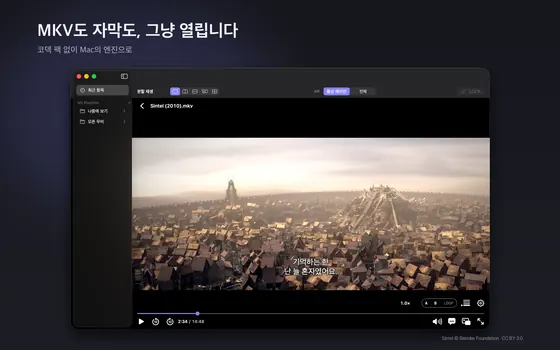
slplayer는 Mac용 동영상 플레이어입니다. Mac에서 영상을 보다 보면 QuickTime에서 열리지 않는 MKV 파일, 글자가 깨져 나오는 자막, 소리가 두 가지 언어로 들어 있는데 항상 첫 번째 트랙만 재생되는 에피소드 같은 불편을 만나게 됩니다. slplayer는 이런 상황을 줄이는 데 초점을 둔 앱입니다. 별도의 코덱 팩이나 자체 디코더를 두지 않고 macOS에 내장된 미디어 엔진으로 재생하기 때문에 가볍고 배터리를 덜 쓰는 편이며, HDR 표시나 화면 속 화면(PiP) 같은 부분도 시스템에 맡깁니다. Mac App Store에서 받을 수 있는 macOS 앱입니다.
화면으로 미리 보기
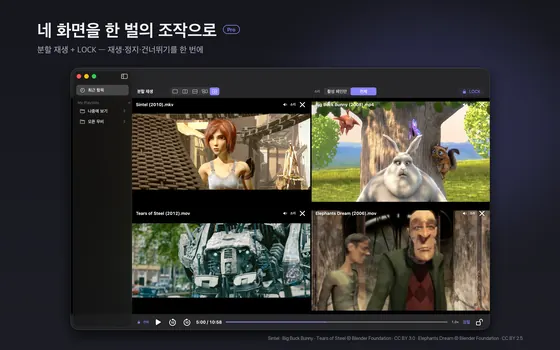
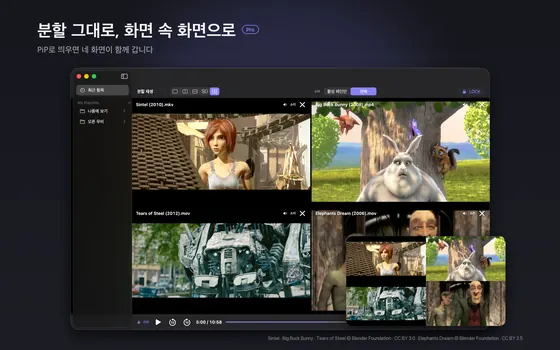
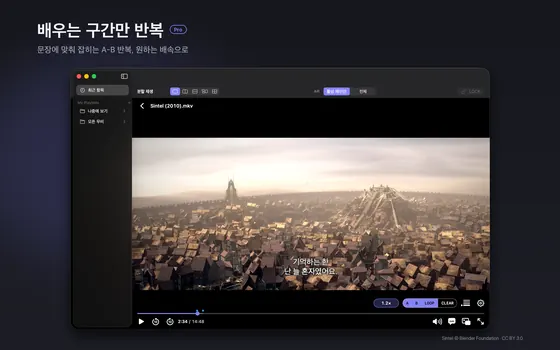
첫 장이 무료 범위의 기본 재생이고 나머지 세 장은 Pro 기능입니다. 화면 속 작은 영상은 Blender Foundation 등의 CC 라이선스 영상으로, 화면 아래 출처가 적혀 있습니다.
지원하는 형식
- 컨테이너: MKV, MP4, M4V, MOV, MPEG-TS
- 영상·음성 코덱: H.264, HEVC(10bit와 HDR10 포함), AAC, AC-3, E-AC-3, FLAC
- 자막: SRT, VTT, SMI. EUC-KR로 저장된 한글 SMI 파일도 자동으로 인식합니다.
중요한 한계도 있습니다. slplayer는 Mac이 지원하는 형식만 재생합니다. 오디오를 재생할 수 없는 파일은 영상만 재생되며, 재생이 시작될 때 알림이 표시됩니다. 이미지 형식 자막(블루레이 등에서 흔한 그림 자막)은 표시되지 않고, 열 수 없는 파일은 오류로 알려 줍니다. 모든 파일이 열린다고 기대하기보다 위 목록에 해당하는 파일이 막힘없이 열린다고 이해하시는 것이 정확합니다.
시작하기
- 앱을 설치하고 실행한 뒤 영상 파일을 창에 끌어다 놓거나, Finder에서 파일을 우클릭해 slplayer로 엽니다. 여러 파일을 한꺼번에 떨어뜨리면 재생목록이 만들어집니다.
- 같은 폴더에 영상과 같은 이름의 자막 파일이 있으면 함께 쓸 수 있습니다. 자막을 따로 불러오는 경우에는 재생 중 자막 메뉴에서 파일을 선택하세요.
- 재생 화면 아래의 조작 막대로 재생, 일시정지, 탐색, 음량, 자막 켜기와 끄기를 합니다. 설정 카드(톱니바퀴)에서 자막 트랙, 싱크, 오디오 트랙을 고를 수 있습니다.
- 도중에 닫아도 최근 항목에서 다시 열면 보던 곳부터 이어서 재생합니다.
자막 기능 자세히
자막 형식과 한글 인코딩
한국어 자막은 오랫동안 EUC-KR(CP949)로 저장된 SMI 파일이 많았고, 이런 파일은 UTF-8만 가정하는 플레이어에서 글자가 깨집니다. slplayer는 EUC-KR을 자동으로 감지합니다. 깨짐의 원인과 해결 방법은 자막 싱크·깨짐 문제 해결법에서 별도로 자세히 설명합니다.
이중 자막
자막 두 개를 동시에 화면에 표시할 수 있습니다. 예를 들어 영어 자막과 한국어 자막을 함께 띄워 두고 영어 문장이 한국어로 어떻게 옮겨졌는지 확인하는 식으로 어학 학습에 쓸 수 있습니다.
0.1초 단위 싱크 조정
자막이 늦거나 빠르면 0.1초 단위로 앞뒤로 옮겨 맞출 수 있습니다. 한 번에 크게 움직이기보다 대사를 한두 개 확인하면서 조금씩 조정하는 것이 정확합니다.
자막 모양
기본 프리셋을 고르거나, 글꼴·색·외곽선·배경 상자를 미리보기를 보면서 조정할 수 있습니다. 밝은 장면에서 글자가 묻히면 외곽선이나 배경 상자를 늘려 보세요. 자막 커스텀 스타일은 Pro 기능으로 분류되어 있습니다.
배속과 이어보기
재생 속도는 0.5배에서 2.0배까지 0.1 단위로 바꿀 수 있습니다. 강의나 어학 콘텐츠를 1.2배에서 1.5배로 보거나, 알아듣기 어려운 대사를 0.8배로 느리게 들을 때 유용합니다. 모든 조작에 키보드 단축키가 있고 앞뒤 건너뛰기 간격도 0.5초에서 30초 사이에서 정할 수 있습니다. 앱 화면 언어는 12개 언어 중에서 앱 안에서 바꿀 수 있습니다.
무료와 Pro의 차이
스토어 설명에 따르면 재생은 무료이고, 파일 열기, MKV, 자막, 싱크, 이중 자막, 배속, 오디오 트랙 선택, 전체 화면, 재생목록, 최근 항목은 무료 범위에 포함됩니다. slplayer Pro는 월간 또는 연간 자동 갱신 구독이며 다음과 같은 편의 기능을 더합니다.
- 최대 4개 영상을 나란히 재생하는 분할 재생
- PiP와 메뉴 막대 미니 플레이어
- A-B 구간 반복과 반복 횟수
- 슬립 타이머, 파일별 설정 기억, 오디오 싱크 오프셋 등
처음 7일 동안은 결제 정보나 구독 가입 없이 Pro 기능을 체험할 수 있다고 안내되어 있습니다. 가격과 조건은 바뀔 수 있으니 스토어 페이지에서 확인하세요.
개인정보
slplayer에는 계정도, 분석도, 광고도 없고 앱이 스스로 네트워크 요청을 하지 않는다고 설명되어 있습니다. 재생하는 파일과 시청 기록은 Mac 밖으로 나가지 않습니다. 자세한 내용은 개인정보 처리방침을 참고하세요.
문제 해결
- 파일이 열리지 않습니다: 컨테이너는 열려도 안쪽 코덱이 Mac에서 지원되지 않으면 재생이 안 될 수 있습니다. 파일 정보를 확인하고 지원 목록과 비교해 보세요.
- 소리가 나지 않고 영상만 나옵니다: 오디오 코덱을 Mac이 재생하지 못하는 경우입니다. 이때는 재생 시작 시 알림이 표시됩니다.
- 자막이 보이지 않습니다: 이미지 형식 자막이거나 자막 트랙이 꺼져 있을 수 있습니다. 설정 카드에서 자막 트랙을 선택했는지 확인하세요.
- 자막이 어긋납니다: 영상과 자막이 서로 다른 판본이라면 싱크 조정만으로 해결되지 않을 수 있습니다. 해결법은 자막 싱크 가이드를 보세요.
한계와 알려진 이슈
- macOS 앱만 있습니다. 현재 스토어에 있는 것은 Mac 버전입니다.
- Mac이 지원하는 형식만 재생합니다. 자체 디코더를 두지 않고 macOS의 미디어 엔진을 쓰기 때문에 가볍지만, 코덱이 지원되지 않으면 열리지 않거나 소리 없이 영상만 나옵니다.
- ASS 자막의 고급 효과는 지원하지 않습니다. 자막은 SRT, VTT, SMI가 명시된 범위이고, 별도 오버레이 방식으로 그리기 때문에 ASS의 고급 타이포그래피와 애니메이션은 구현하지 않았습니다. 그림 형식 자막도 표시되지 않습니다.
- Pro는 구독입니다. 7일 무약정 체험이 끝나면 분할 재생, PiP, A-B 반복 같은 Pro 기능은 잠기고 기본 시청 기능은 계속 무료입니다. 가격과 조건은 스토어 페이지가 기준입니다.
- 자막 어긋남은 싱크로 해결되지 않을 수 있습니다. 영상과 자막이 서로 다른 판본이면 0.1초 단위 조정만으로 맞지 않습니다.
다른 방법과 비교
모든 파일을 열어야 한다면 더 넓은 코덱을 자체 지원하는 범용 플레이어가 맞을 수 있고, slplayer는 Mac 내장 엔진 위에서 가볍게 보는 쪽에 초점을 둡니다.
| 선택지 | 강점 | 약점 |
|---|---|---|
| slplayer | MKV와 한글 SMI(EUC-KR) 자막, 이중 자막, 가볍고 배터리 부담이 적음 | Mac 지원 형식 한정, ASS 고급 효과·그림 자막 없음, 일부 기능은 Pro |
| QuickTime Player | 기본 설치, 간단함 | MKV 같은 컨테이너가 열리지 않는 경우가 많음 |
| 자체 디코더를 내장한 범용 플레이어 | 가장 넓은 형식과 자막 호환 | 앱이 크고 전력 소모가 상대적으로 클 수 있음 |
자막 문제의 원인과 해결은 자막 싱크·깨짐 가이드에 따로 정리했습니다.
자주 묻는 질문
Windows나 iPhone에서도 쓸 수 있나요?
현재 스토어에 올라온 것은 macOS 버전입니다.
ASS 자막도 되나요?
스토어 설명에 명시된 자막 형식은 SRT, VTT, SMI입니다. 그 밖의 형식은 보장하지 않습니다.
가입이 필요한가요?
아니요. 계정 없이 쓸 수 있습니다.
Pro 없이도 충분한가요?
영상 재생과 자막, 배속 같은 기본적인 시청은 무료 범위입니다. 분할 재생이나 A-B 반복이 필요할 때만 Pro를 고려하면 됩니다.
문의는 어디로 하나요?
지원 페이지를 이용하세요.
Pro 체험은 어떻게 되나요?
처음 7일 동안 결제 정보나 구독 가입 없이 Pro 기능을 체험할 수 있습니다. 체험이 끝나면 Pro 기능은 잠기고 기본 시청 기능은 계속 무료입니다.
한글 자막이 깨져 보이면 어떻게 하나요?
EUC-KR로 저장된 SMI 파일은 자동으로 인식합니다. 그래도 깨지거나 어긋나면 자막 싱크·깨짐 가이드의 원인별 해결법을 확인하세요.
What slplayer is
slplayer is a video player for the Mac. Anyone who watches a lot of video on a Mac eventually runs into the same annoyances: an MKV file that QuickTime refuses to open, a subtitle file that shows up as garbled characters, or an episode with two audio languages where only the first track ever plays. slplayer is built to reduce exactly those problems. It uses the media engine built into macOS rather than a codec pack or its own decoder, which keeps it light and gentle on battery, and it leaves things like HDR display and picture-in-picture to the system. It is a macOS app available on the Mac App Store.
Screens at a glance
The first image shows basic playback in the free range, and the other three are Pro features. The sample videos are Creative Commons films from the Blender Foundation and others, credited at the bottom of each image.
Supported formats
- Containers: MKV, MP4, M4V, MOV, MPEG-TS
- Video and audio codecs: H.264, HEVC (including 10-bit and HDR10), AAC, AC-3, E-AC-3, FLAC
- Subtitles: SRT, VTT, SMI. Korean SMI files saved in EUC-KR are detected automatically.
There are honest limits. slplayer plays only what the Mac supports. If a file has audio the Mac cannot decode, the video plays without sound and a notice appears when playback starts. Image-based subtitles, such as the picture subtitles common on discs, are not displayed, and a file that cannot be opened is reported as an error. The accurate expectation is not that every file opens, but that files matching the list above open without fuss.
Getting started
- Install and launch the app, then drag a video onto the window or open it from Finder with slplayer. Dropping several files at once creates a playlist.
- If a subtitle file with the same name sits next to the video, it can be used with it. To load one manually, choose it from the subtitle menu during playback.
- Use the control bar at the bottom for play, pause, seeking, volume, and turning subtitles on or off. The settings card (the gear icon) lets you pick the subtitle track, adjust sync, and choose the audio track.
- If you close a video partway through, reopening it from the recent items list resumes where you left off.
Subtitle features in detail
Formats and Korean encodings
For many years Korean subtitles were distributed as SMI files saved in EUC-KR (CP949), and players that assume UTF-8 show those as garbage. slplayer detects EUC-KR automatically. The causes and fixes for garbled text are covered separately in Fixing subtitle sync and garbled-text problems.
Dual subtitles
You can show two subtitle tracks at the same time. For language study, put an English track and a Korean track on screen together and see how a sentence was translated.
Sync in 0.1-second steps
If subtitles come too late or too early, shift them forward or back in 0.1-second steps. Rather than one big jump, check a couple of lines of dialogue and nudge gradually.
Subtitle appearance
Choose a preset style, or adjust font, color, outline, and background box with a live preview. If text gets lost on bright scenes, increase the outline or add a background box. Custom subtitle styling is listed as a Pro feature.
Speed and resume
Playback speed runs from 0.5x to 2.0x in 0.1 steps. It is handy for watching lectures or language content at 1.2x to 1.5x, or for slowing a hard-to-catch line to 0.8x. Every action has a keyboard shortcut, and the skip interval can be set between half a second and thirty seconds. The interface language can be switched inside the app among 12 languages.
Free and Pro
According to the store description, playback is free, and the free scope includes opening files, MKV, subtitles, sync, dual subtitles, speed, audio track selection, full screen, playlists, and recent items. slplayer Pro is an auto-renewing monthly or yearly subscription that adds conveniences such as:
- split playback of up to four videos side by side
- picture-in-picture and a menu bar mini player
- A-B loop with repeat counts
- a sleep timer, per-file setting memory, and an audio sync offset
The listing says all Pro features can be tried free for the first seven days without payment details or a subscription. Prices and terms may change, so check the store page.
Privacy
The listing states that slplayer has no accounts, no analytics, and no ads, and that the app makes no network requests of its own. The files you play and your viewing history stay on your Mac. See the privacy policy for details.
Troubleshooting
- A file will not open: a container may open while the codec inside is unsupported by the Mac. Check the file details and compare them with the supported list.
- Picture but no sound: the audio codec cannot be played by the Mac. A notice appears when playback starts.
- Subtitles do not appear: they may be image-based, or the subtitle track may be off. Check that a subtitle track is selected in the settings card.
- Subtitles drift out of sync: if the video and the subtitle file come from different releases, a single offset may not fix it. See the subtitle sync guide.
Limits and known issues
- macOS only. The version in the store is the Mac app.
- It plays only what the Mac supports. It uses the macOS media engine instead of its own decoders, which keeps it light, but if a codec is unsupported the file will not open or will play video without sound.
- Advanced ASS effects are not supported. The documented subtitle formats are SRT, VTT and SMI, and because subtitles are drawn by a separate overlay, ASS typography and animation are not implemented. Image-based subtitles are not shown either.
- Pro is a subscription. After the 7-day no-commitment trial, Pro features such as split playback, PiP and A-B loop lock while basic viewing stays free. Prices and terms are whatever the store page shows.
- Subtitle drift may not be fixable by syncing. If the video and subtitles are different releases, 0.1 s adjustments alone will not line them up.
How it compares
If you must open every file, a general-purpose player with its own broader codecs may fit better; slplayer focuses on light viewing on top of the Mac built-in engine.
| Option | Strength | Weakness |
|---|---|---|
| slplayer | MKV and Korean SMI (EUC-KR) subtitles, dual subtitles, light on battery | Limited to Mac-supported formats, no advanced ASS or image subtitles, some features need Pro |
| QuickTime Player | Preinstalled and simple | Often cannot open containers like MKV |
| A general player with built-in decoders | Widest format and subtitle compatibility | Larger app and possibly higher power use |
Causes and fixes for subtitle problems are covered separately in the subtitle sync and garbled text guide.
Frequently asked questions
Is there a Windows or iPhone version?
The version listed in the store is for macOS.
Does it support ASS subtitles?
The subtitle formats named in the store description are SRT, VTT, and SMI. Others are not guaranteed.
Do I need an account?
No. It works without one.
Is the free version enough?
Everyday watching, with subtitles and speed control, is within the free scope. Consider Pro only if you need split playback or A-B looping.
Where do I get help?
Use the support page.
What happens with the Pro trial?
For the first 7 days you can try Pro features without payment details or a subscription. After the trial, Pro features lock and basic viewing stays free.
What if Korean subtitles look garbled?
SMI files saved in EUC-KR are detected automatically. If they still look wrong or drift, see the subtitle guide for fixes by cause.