LapLync 사용 가이드
LapLync Guide: a synced stopwatch and lap timer for multiple devices
LapLync는 여러 기기의 스톱워치를 같은 순간에 시작시키고, 랩과 분할 시간을 기록하는 앱입니다. iPhone과 iPad에서 쓰며 계정 없이 6자리 룸 코드나 QR만으로 참가합니다. 운동장 사이드라인에서 선수들을 측정하는 코치, 여러 지점에서 기록을 남기는 대회 진행 요원처럼 "시작 순간이 같아야 비교가 되는" 사람들을 위한 도구입니다. 이 가이드는 기본 사용 순서와 연결이 불안정할 때의 동작, 기록 보관 방법을 정리했습니다.
어떤 문제를 해결하나요
스톱워치 여러 개를 동시에 누르는 일은 생각보다 어렵습니다. "시작" 구호에 맞춰 눌러도 사람마다 반응 속도가 다르고, 한 사람이 모든 기기를 건드릴 수도 없습니다. 결국 기록을 맞춰 보면 서로 0.2초에서 1초씩 어긋나 선수 간 비교가 흐려집니다.
LapLync는 한 기기에서 시작을 누르면 룸에 있는 모든 기기가 같은 시작 시각을 공유합니다. 각 기기는 네트워크 시간으로 보정한 시계를 기준으로 경과 시간을 계산하므로, 시작 신호가 도착하는 지연과 상관없이 같은 기준점에서 시간을 셉니다. 앱 설명에서는 이 보정이 수십 밀리초 수준을 목표로 한다고 안내합니다.
누구에게 맞나요
- 선수 여러 명에게 휴대폰을 나눠 주고 랩을 기록하는 코치와 트레이너
- 구간마다 기기를 두고 동시에 측정해야 하는 대회 기록원과 심판
- 같은 시간 기준으로 여러 지점의 사건을 기록해야 하는 실험·관찰 활동
- 친구들과 같은 출발선에서 경쟁하는 기록을 간단히 남기고 싶은 사람
화면으로 미리 보기
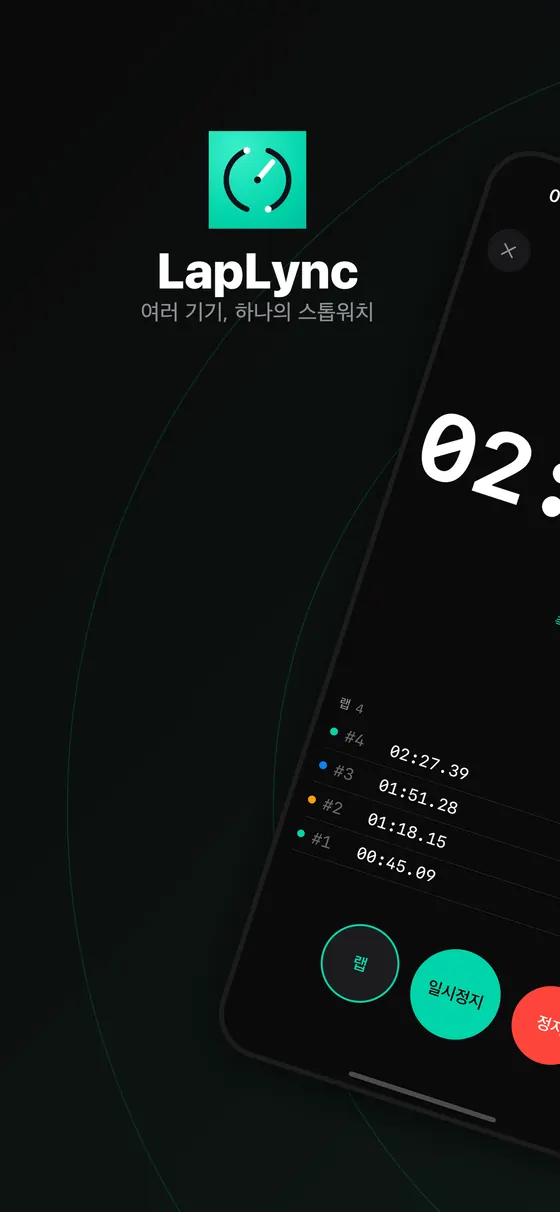
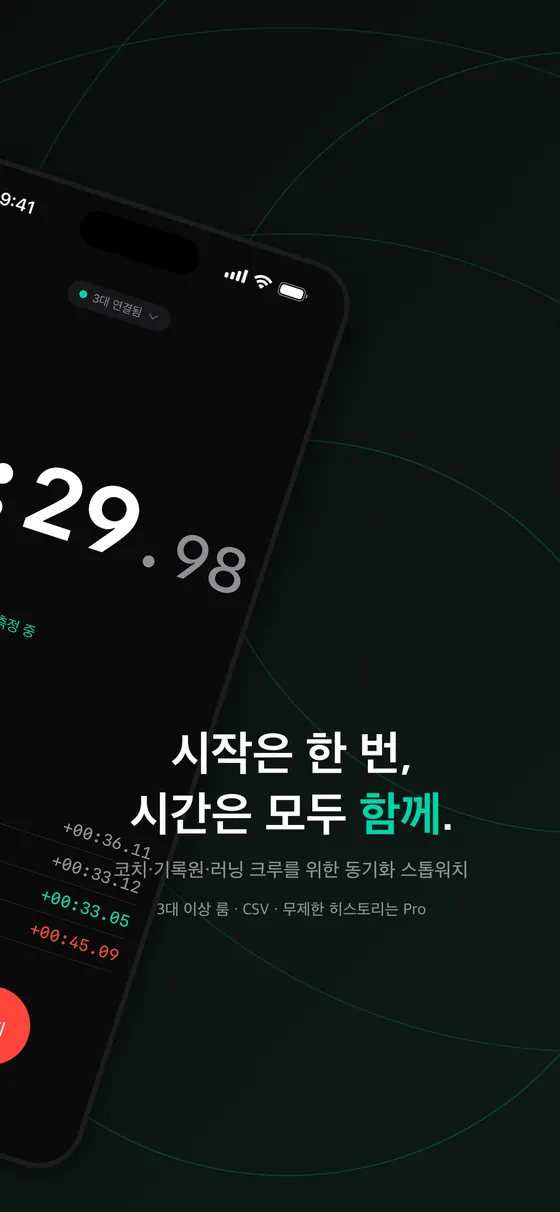
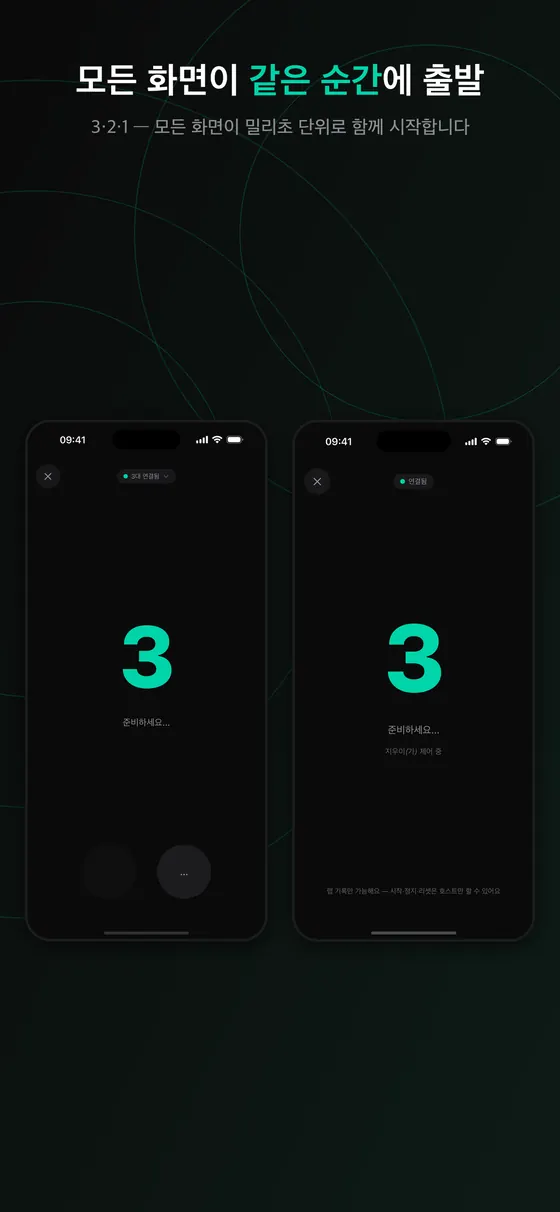
아래 다섯 장은 스토어 스크린샷이라 위쪽에 홍보 문구가 있고, 화면은 iPhone 앱입니다. 룸을 만들고, 출발하고, 랩이 쌓이는 순서로 보시면 됩니다.
사용 방법
1. 룸 만들기
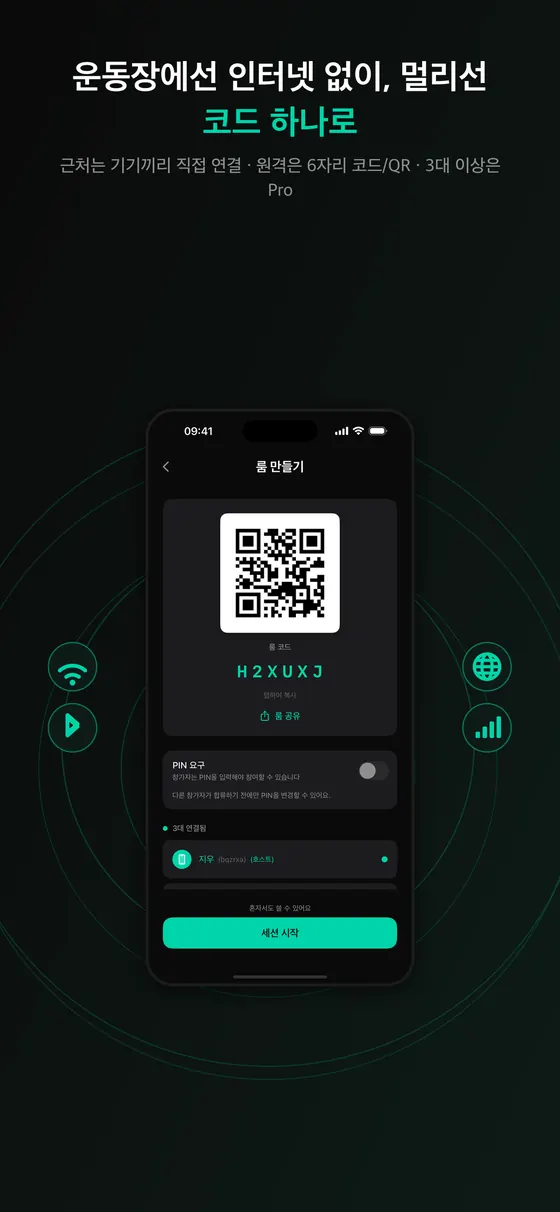
- 측정을 진행할 기기에서 룸을 만듭니다. 6자리 코드와 QR이 표시됩니다.
- 다른 기기에서 룸 참가를 눌러 코드를 입력하거나 QR을 스캔합니다.
- 참가자 목록에서 모든 기기가 보이는지 확인합니다.
2. 시작과 랩 기록
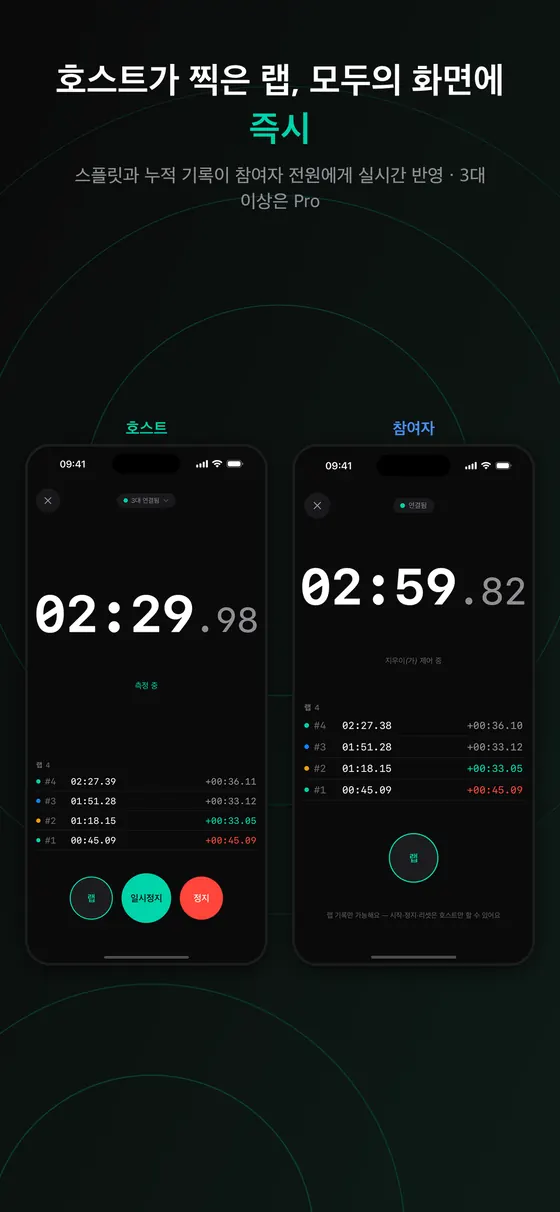
시작 버튼을 누르면 3, 2, 1 카운트다운이 모든 화면에 함께 표시된 뒤 스톱워치가 같은 순간에 시작합니다. 달리는 도중에는 랩 버튼으로 구간 시간을 남기고, 앱은 랩과 분할 시간을 자동으로 정리합니다. 별도의 장비나 수기 입력이 필요하지 않습니다.
3. 정지와 기록 확인
측정이 끝나면 정지하고 기록을 확인합니다. 지난 세션은 기록 화면에 남습니다. 무료로 쓸 때는 최근 세션 3개가 기기에 저장되고, Pro를 열면 세션 기록을 제한 없이 보관하며 CSV로 내보낼 수 있습니다.
연결이 불안정해도 측정이 이어지는 구조
현장에서는 Wi-Fi가 약하거나 휴대폰이 잠깐 대기 상태로 들어가는 일이 흔합니다. LapLync는 세 단계로 연결을 구성합니다.
- 같은 장소의 기기끼리는 블루투스와 Wi-Fi 기반 근거리 연결을 먼저 씁니다.
- 기기가 서로 다른 네트워크에 있으면 인터넷 중계로 자동 전환합니다.
- 모든 연결이 끊겨도 각 기기는 보정해 둔 시간 기준으로 계속 측정하고, 연결이 돌아오면 기록이 자동으로 병합됩니다.
그래서 화면에 재연결 중이라는 배너가 잠깐 보여도 스톱워치는 멈추지 않습니다. 다만 모든 환경에서 완벽하다고 장담할 수는 없으니, 중요한 대회에서는 사전 리허설을 권합니다.
무료와 Pro
한 번 결제하는 Pro 언락이 있으며 구독이 아닙니다. 무료로는 두 대 룸을 만들 수 있고 다른 사람이 만든 룸에는 횟수 제한 없이 참가할 수 있습니다. 동시 시작, 랩 기록, 분할 시간, 모든 연결 방식은 무료에 포함됩니다. Pro는 최대 여덟 대 룸, CSV 내보내기, 무제한 세션 기록을 엽니다. Pro가 필요한 사람은 룸을 만드는 쪽뿐이고, 참가자는 결제가 필요 없습니다. 가격은 스토어 화면에서 확인하세요.
현장 운영 예시: 코치 한 명, 선수 네 명
400미터 트랙에서 선수 네 명의 랩을 재는 장면을 가정해 보겠습니다. 이 시나리오는 앱 기능을 이해하기 위한 예시이며 특정 대회의 규정과는 관계가 없습니다.
- 코치가 자기 폰에서 룸을 만들고 PIN을 켭니다. 무료는 두 대, 네 명을 모두 연결하려면 룸을 만드는 코치가 Pro를 열어 두어야 합니다. Pro는 룸을 만들기 전에 열어 두는 편이 안전합니다. 세션 도중 구매가 원격 연결의 정원에 바로 반영되는지는 개발 문서에서도 미확정 사항으로 남아 있습니다.
- 기록원 세 명이 각자 폰으로 QR을 스캔해 참가합니다. 참가자 목록에서 네 대가 모두 보이는지 확인합니다.
- 출발선에서 코치가 시작을 누르면 3·2·1이 모든 화면에 뜨고 같은 순간에 스톱워치가 돌아갑니다.
- 랩마다 담당 기록원이 랩 버튼을 누릅니다. 사전에 "1번 기기는 1레인" 식으로 정해 두면 정리가 쉽습니다.
- 끝나면 코치가 정지하고 기록 화면에서 랩과 분할 시간을 확인합니다. Pro라면 CSV로 내보내 스프레드시트에서 선수별로 정리합니다.
이 방식이 정밀한 공인 기록을 대체하지는 않습니다. 앱의 시계 보정은 기기 간 출발 시각의 어긋남을 줄여 주는 것이고, 랩 버튼을 누르는 사람의 반응 지연은 그대로 남습니다. 연습과 훈련 기록, 비공식 경기용으로 보는 것이 맞습니다.
효과적으로 쓰는 요령
- 시작하기 전에 모든 기기가 참가자 목록에 보이는지 확인하세요. 한 대라도 빠지면 그 기기는 같은 시작 신호를 받지 못할 수 있습니다.
- 기기마다 담당 구간이나 선수를 정해 두면 나중에 기록을 정리하기 쉽습니다.
- 충전 상태와 자동 잠금 설정을 확인하세요. 화면이 꺼져도 측정은 이어지도록 설계되었지만, 배터리가 방전되면 끝입니다.
- CSV로 내보낸 파일은 AirDrop, 메일, 다른 앱으로 공유할 수 있으니 측정 직후 보관본을 만들어 두세요.
- 같은 장소에 있다면 근거리 연결이 가장 빠르고, 멀리 떨어진 기기는 인터넷 중계를 쓰므로 지연이 조금 더 클 수 있습니다.
한계와 알려진 이슈
- iPhone과 iPad 전용입니다. iOS 17 이상이 필요하며 안드로이드와 윈도우에서는 룸에 참가할 수 없습니다.
- 시간 보정은 목표치입니다. 네트워크 시간(NTP) 기반 보정으로 수십 밀리초 수준을 목표로 하지만 보증값이 아닙니다. 전용 계시 장비나 광전관 같은 공인 타이밍 시스템을 대체하지 않습니다.
- 사람이 누르는 순간이 가장 큰 오차 요인입니다. 앱이 시계 어긋남을 줄여도 랩 버튼을 누르는 반응 지연은 줄일 수 없으므로 같은 사람이 같은 기준으로 누르게 하세요.
- 가까운 기기는 근거리 연결, 떨어진 기기는 인터넷 중계입니다. 근거리 연결은 기기 최대 여덟 대까지이며, 중계 경로는 지연이 조금 더 클 수 있습니다.
- 참가자는 시작·정지·리셋을 할 수 없습니다. 화면 안내대로 이 세 가지는 호스트 전용이고, 참가자는 랩 기록만 가능합니다.
- 무료에서는 최근 세션 3개 위주로 보입니다. 그보다 오래된 기록은 Pro에서 제한 없이 열립니다. 필요한 기록은 정한 시점에 내보내 두세요.
- 모든 환경에서 완벽하지는 않습니다. 연결이 끊겨도 각 기기가 계속 측정하고 복귀 시 병합하도록 설계되었지만, 중요한 대회 전에는 리허설을 하세요.
문제가 생겼을 때
- QR 스캔이 안 될 때: 카메라 권한을 허용했는지 확인하고, 안 되면 6자리 코드를 직접 입력하세요.
- 세 번째 기기가 들어가지 못할 때: 룸을 만든 기기가 Pro가 아니면 정원이 두 대입니다.
- 다른 기기의 기록과 몇 초 차이가 날 때: 기기의 날짜와 시간이 자동 설정인지 확인하고, 인터넷에 한 번도 연결되지 않은 상태가 아닌지 점검하세요.
- 기록이 사라진 것 같을 때: 무료 상태에서는 최근 세션 3개만 보관됩니다. 필요한 기록은 Pro로 내보내거나 따로 옮겨 두세요.
개인정보
계정, 광고, 위치 정보, 연락처 수집이 없습니다. 룸 안에서 기기를 구분하고 이름을 표시하기 위해 기기 식별자와 기기 이름이 사용되며, 룸이 활성인 동안만 임시로 보관되고 세션이 끝나면 삭제됩니다. 더 자세한 내용은 개인정보처리방침을 확인하세요.
다른 방법과 비교
| 방법 | 강점 | 약점 |
|---|---|---|
| LapLync 룸 | 출발 시각 공유, 랩·분할 자동 정리, 계정 불필요, 근거리·원격 연결 | iPhone·iPad 전용, 사람이 누르는 지연은 남음, 무료는 두 대 |
| 스톱워치 한 대로 수기 기록 | 무료, 장비 불필요 | 한 명이 여러 사람을 재기 어렵고 나중에 옮겨 적어야 함 |
| 영상 촬영 후 프레임 확인 | 사후 검증 가능, 출발과 도착이 영상에 남음 | 정리 시간이 오래 걸리고 즉시 기록은 어려움 |
| 전용 계시 장비(광전관 등) | 가장 정밀하고 공인 대회에 적합 | 비용과 설치 부담 |
훈련과 비공식 경기라면 LapLync로 충분한 경우가 많고, 공인 기록이 필요하면 전용 장비가 맞습니다. 여러 기기의 시간이 어떻게 맞춰지는지는 동기화 타이머 글에서 배경을 설명합니다.
출처 및 더 읽을거리
- IETF RFC 5905: Network Time Protocol Version 4
- Apple Developer: Multipeer Connectivity
- Apple Developer: TN3179 로컬 네트워크 개인정보 보호 이해
자주 묻는 질문
안드로이드나 윈도우에서도 쓸 수 있나요?
현재는 iPhone과 iPad 기반이며 iOS 17 이상이 필요합니다.
룸 코드는 얼마나 오래 유효한가요?
룸은 세션이 진행되는 동안만 존재하고, 세션이 끝나면 사라집니다.
한 사람이 여러 대를 쓸 수 있나요?
가능합니다. 다만 무료에서 룸을 만들면 기기가 두 대까지이고, 더 많은 기기를 쓰려면 룸 생성자가 Pro를 열어야 합니다.
인터넷이 끊기면 기록이 날아가나요?
측정은 각 기기에서 계속되고 연결이 돌아오면 병합되도록 설계되어 있습니다.
카운트다운 없이 바로 시작할 수 있나요?
룸에 여러 기기가 있을 때는 시작 시각을 모두에게 맞추기 위해 3, 2, 1 카운트다운이 표시됩니다.
문의는 어디로 하나요?
지원 페이지에서 접수할 수 있습니다.
PIN은 꼭 써야 하나요?
선택 사항입니다. 룸 만들기 화면의 PIN 요구 스위치를 켜면 참가자가 PIN을 입력해야 들어올 수 있고, 켜지 않으면 코드나 QR만으로 참가합니다. 사람이 많은 장소에서는 켜 두는 편이 안전합니다.
참가자도 랩을 찍을 수 있나요?
화면 안내에 따르면 참가자는 랩 기록이 가능하고 시작·정지·리셋은 호스트만 할 수 있습니다.
LapLync starts stopwatches on several devices at the same moment and records laps and split times. It runs on iPhone and iPad, and people join with a six-digit room code or a QR code, with no account. It is made for people who need a shared starting instant to make times comparable: a coach measuring athletes on the sideline, or an event official logging results at several points. This guide covers the basic workflow, what happens when the connection is shaky, and how records are kept.
What problem does it solve?
Pressing several stopwatches at once is harder than it sounds. Even with a "go" call, reaction times differ, and one person cannot touch every device. When the results are compared, they are often a fraction of a second to a full second apart, which blurs comparisons between athletes.
In LapLync, when one device presses start, every device in the room shares the same start time. Each device computes elapsed time from a clock corrected against network time, so the delay in delivering the start signal does not change the reference point. The store description says this correction aims at tens of milliseconds.
Who is it for?
- Coaches and trainers who hand phones to several athletes and record laps.
- Event recorders and officials who place a device at each segment and need simultaneous timing.
- Experiments or observation exercises that record events at several places on one time base.
- Friends who want a simple record of a race from a shared start line.
Screens at a glance
The five images below are store screenshots with a promo headline on top; the screens are the iPhone app. Read them in order: create a room, start, and watch laps build up.
How to use it
1. Create a room
- On the device that will run the session, create a room. A six-digit code and a QR code appear.
- On the other devices, tap Join Room and enter the code or scan the QR code.
- Check that every device appears in the participant list.
2. Start and record laps
When you press start, a 3-2-1 countdown shows on every screen and the stopwatch begins at the same moment. During the run, the lap button records a segment time, and the app arranges laps and split times automatically. No extra equipment or handwritten notes are needed.
3. Stop and review
When the measurement ends, stop it and review the results. Past sessions stay in the history screen. On the free tier the three most recent sessions are stored on the device. Pro keeps session history without a limit and lets you export it as CSV.
Staying accurate when connections are unreliable
On site, Wi-Fi is often weak and phones sometimes drop into standby. LapLync layers its connections in three steps.
- Devices in the same place use a local Bluetooth and Wi-Fi connection first.
- If devices are on different networks, it switches to an internet relay automatically.
- If every connection is lost, each device keeps measuring against its corrected time reference, and the records merge automatically when the connection returns.
So even when a reconnecting banner briefly appears, the stopwatch does not stop. No tool can promise perfection in every environment, so for an important event, run a rehearsal first.
Free versus Pro
There is a one-time Pro unlock, not a subscription. For free you can create a room of two devices and join rooms created by others without a limit on how often. Simultaneous start, lap recording, split times and all connection modes are included for free. Pro adds rooms of up to eight devices, CSV export and unlimited session history. Only the person who creates the room needs Pro, and participants never have to pay. See the store page for the current price.
A field example: one coach, four athletes
Imagine timing laps for four athletes on a 400 m track. This is an illustration of how the app features fit together and has nothing to do with the rules of any particular competition.
- The coach creates a room on their own phone and turns on the PIN. Free allows two devices, so to connect all four, the coach who creates the room needs Pro. It is safer to unlock Pro before creating the room. Whether a purchase made mid-session immediately raises the capacity for remote connections is still listed as an open item in the development notes.
- Three recorders scan the QR code with their phones to join. Check that all four devices appear in the participant list.
- At the start line the coach presses start, 3-2-1 shows on every screen, and the stopwatches begin at the same moment.
- For each lap, the assigned recorder presses the lap button. Agreeing in advance that "device 1 is lane 1" makes sorting easy.
- When it is over, the coach stops the session and reviews laps and splits on the history screen. With Pro you can export CSV and sort by athlete in a spreadsheet.
This does not replace precise official timing. The app's clock correction reduces the gap between devices' start times, but the reaction delay of whoever presses the lap button remains. Think of it as a tool for practice, training logs and informal races.
Tips for good results
- Before starting, confirm every device is in the participant list. A device that is missing may not receive the same start signal.
- Assign each device a segment or athlete in advance so that records are easy to sort later.
- Check battery level and auto-lock. Measurement is designed to continue when the screen turns off, but a dead battery ends it.
- Exported CSV files can be shared through AirDrop, mail or other apps, so make a backup copy right after measuring.
- Devices in the same place get the fastest local link. Far-apart devices use the internet relay and may see slightly more delay.
Limits and known issues
- It is for iPhone and iPad only. It needs iOS 17 or later, and Android and Windows devices cannot join a room.
- The time correction is a target. It aims at tens of milliseconds using network time (NTP) but is not a guarantee, and it does not replace dedicated timing equipment or certified systems such as photo-finish gates.
- The human press is the largest source of error. Even if the app narrows clock drift, the reaction delay of pressing the lap button cannot be removed, so have the same person press by the same rule.
- Nearby devices use a local link, and distant ones use the internet relay. The local link supports up to eight devices, and the relay path can add a little more delay.
- Participants cannot start, stop or reset. As the on-screen note says, those three are host-only and participants can only record laps.
- Free mainly shows the three most recent sessions. Older records open without limit on Pro. Export what you need at a moment you choose.
- It is not perfect in every environment. Each device is designed to keep measuring through a disconnect and merge on return, but rehearse before an important event.
Troubleshooting
- QR scanning does not work: check that camera permission is allowed, or type the six-digit code instead.
- A third device cannot join: if the device that created the room is not on Pro, the room holds two devices.
- Times differ by seconds from another device: make sure date and time are set automatically and that the device has been online at least once.
- A record seems to be gone: the free tier keeps only the three most recent sessions. Export what you need with Pro or copy it elsewhere.
Privacy
The app has no accounts and no ads, and it does not collect location or contacts. A device identifier and device name are used to tell devices apart inside a room, kept temporarily only while the room is active and deleted when the session ends. See the privacy policy for details.
How it compares
| Method | Strengths | Weaknesses |
|---|---|---|
| A LapLync room | Shared start time, automatic laps and splits, no account, local and remote links | iPhone and iPad only, human press delay remains, two devices on free |
| One stopwatch with handwritten notes | Free, no gear | One person struggles to time several athletes and must copy results later |
| Filming and checking frames afterward | Verifiable later, start and finish are on video | Takes a long time to process and gives no instant record |
| Dedicated timing equipment (photo-finish gates and so on) | Most precise, suited to certified events | Cost and setup effort |
For training and informal races LapLync is often enough, and for certified results dedicated equipment is the right tool. The background on how several devices agree on time is in our article on synchronized timers.
Sources and further reading
- IETF RFC 5905: Network Time Protocol Version 4
- Apple Developer: Multipeer Connectivity
- Apple Developer: TN3179 Understanding local network privacy
FAQ
Can I use it on Android or Windows?
Currently it is for iPhone and iPad and requires iOS 17 or later.
How long does a room code stay valid?
A room exists only while the session is running and disappears afterward.
Can one person run several devices?
Yes. On the free tier a room you create holds two devices, and to use more the room creator needs Pro.
Will records be lost if the internet drops?
Each device keeps measuring and the records are designed to merge when the connection returns.
Can I start without the countdown?
When several devices are in the room, the 3-2-1 countdown is shown so everyone can share the same start time.
Where do I ask for help?
Use the support page.
Do I have to use the PIN?
It is optional. With the Require PIN switch on the Create Room screen turned on, participants must enter the PIN to join; otherwise the code or QR is enough. In crowded places it is safer to turn it on.
Can participants record laps too?
According to the on-screen note, participants can record laps while start, stop and reset are host-only.